


Last Updated: October 27, 2026
Quick Summary
Cheap charging cables are not automatically dangerous, but a poorly made one can overheat, melt at the connector, or damage your phone's charging port. Most fire risk actually lives in the wall adapter, not the cable, so spend on a certified adapter first and then the cable.
- Look for USB-IF certification, a stated wattage, solid connectors, and flexible strain relief before buying.
- Stop using any cable with frayed jackets, exposed wires, melting, excess heat, or a loose connector.
- Thin conductors like 28 AWG raise resistance and heat compared with 20 AWG at 3A charging currents.
- A USB-A to USB-C cable cannot negotiate USB Power Delivery because the A end lacks a configuration channel pin.
- Certification covers power ratings and safety compliance but not wear, abuse, or counterfeit copies.
Table of Contents
- The Short Answer: Cheap Charging Cables and Real Risk
- Cable vs. Adapter: Where the Danger Actually Lives
- How to Tell If a Charging Cable Is Safe
- Signs of a Damaged Charging Cable You Should Never Ignore
- What Certified Charging Cables Actually Guarantee
- Build Quality: What Separates a $5 Cable From a $25 One
- Picking a Cable That Fits Your Setup
- Frequently Asked Questions
The Short Answer: Cheap Charging Cables and Real Risk
Cheap charging cables are not automatically dangerous, but the risk is real and it is not evenly spread.
Here is the honest version: a poorly made cable can overheat, melt at the connector, or damage the charging port on your phone.
The bigger issue is that cheap cables hide their quality. You cannot see the wire gauge or the insulation through the plastic.
Cable vs. Adapter: Where the Danger Actually Lives
Most of the fire risk people worry about lives in the wall adapter, not the cable.
The cable carries current and negotiates power delivery with the device.
That distinction matters when you shop.
If you are wondering whether it is worth upgrading the adapter side, our guide on whether GaN chargers are worth it for multiple devices covers that trade-off.
So the practical rule is simple: spend on the adapter first, then the cable.
How to Tell If a Charging Cable Is Safe
Safe cables share a few traits you can check before you buy. None of them require special tools. They require knowing what to look for.
- Look for a certification mark. USB-IF certification is the main one for USB-C. It means the cable passed a compliance test. No mark, no proof.
- Check the power rating. A cable sold for fast charging should state its wattage. If the listing is vague, assume it is a basic cable.
- Inspect the connectors. Metal should feel solid, not loose. The housing should not flex when you bend it.
- Check the strain relief. That is the joint where the cable meets the plug. Good cables have a flexible sleeve there.
- Buy from a seller who names the maker. Unknown provenance is the biggest warning sign of all.
The USB Implementers Forum publishes the certification standards behind these marks if you want the source detail.
Signs of a Damaged Charging Cable You Should Never Ignore
A damaged cable announces itself if you know the signs. Stop using it and replace it when you see any of these:
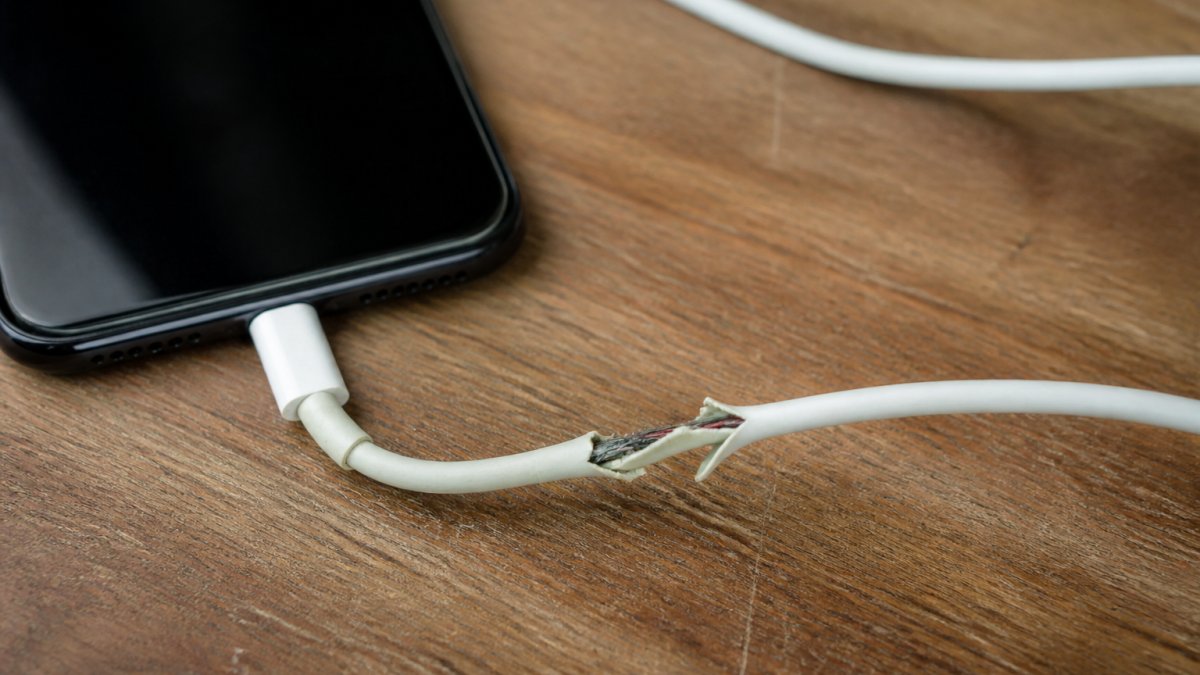
- Frayed cable jacket, especially near the plug
- Exposed wires showing through the outer layer
- Melting or discoloration at the connector
That last one catches people. A cable that used to charge fast and now crawls is telling you something.
Watch out: continuing to use a cable with exposed wires risks a short at the connector, and that can damage the charging port or the phone's internal components.
If tangled, worn cables are part of the problem, our guide on how to organize nightstand cables covers a cleaner setup that puts less stress on the cable.
What Certified Charging Cables Actually Guarantee
Certified charging cables guarantee that the cable met a published standard for power delivery, data, and build at the time it left the factory. They do not guarantee it will last forever, and they do not guarantee it is genuine.
The practical problem is that "certified" is a vague word on a listing. Here is how to turn it into something you can actually verify before you buy.
The specification checks that matter
A cable listing that is serious about safety will state four things. If any of them are missing, treat the cable as uncertified regardless of what the photos show.
- USB standard and generation. Look for an explicit standard such as USB 2.0, USB 3.2 Gen 2, or USB4. A listing that says only "fast charging cable" is telling you nothing about data or power capability. USB 2.0 cables are common and fine for charging, but they cap data at 480 Mbps and typically top out at lower power ratings than USB-C Power Delivery cables.
- Power rating in watts. A USB-C cable sold for fast charging should state a wattage, for example, 60W, 100W, or 240W. That number reflects the cable's electronically marked capability under the USB Power Delivery specification. If the listing is vague, assume it is a basic cable limited to standard 5V charging.
- Connector type at both ends. USB-C to USB-C, USB-A to USB-C, and USB-C to Lightning are not interchangeable. A USB-A to USB-C cable cannot negotiate USB Power Delivery at all, because the A end has no configuration channel pin. That single detail explains most "my fast charger charges slowly" complaints.
- Marking location and form. Genuine USB-IF certification is tied to a test ID, and compliant cables and their packaging carry the certified USB logo and, for USB-C, an electronically marked chip that the device reads during negotiation. A logo printed on a generic poly bag with no test ID is a red flag, not proof.
What certification covers and what it does not
| What certification covers | What it does not cover |
|---|---|
| Power delivery ratings under the USB Power Delivery spec | Wear over time |
| Data transfer speed for the stated USB generation | Physical abuse |
| Basic electrical safety and connector compliance | Counterfeit copies |
| Electronically marked cable capability | Your specific device's negotiation behavior |
The counterfeit problem is real. A cable can carry a fake mark and still be junk. That is why buying from a seller who stands behind the product matters as much as the mark itself, and why the specification checks above matter more than the logo.
Upgraded Multi Charging Cable for Apple Watch Charger 4 in 1 Fast iPhone Watch →
For the official list of compliant products, the USB-IF product search is the place to check. The USB Implementers Forum publishes the certification standards behind these marks if you want the source detail.
Risk calibration
Certification lowers risk; it does not eliminate it. A certified cable can still fail after years of bending, and a certified cable can still be counterfeit. The honest framing is that certification is a baseline check on design and build, not a guarantee against wear, abuse, or fraud. Pair it with the physical inspection steps in the next section, and you have a realistic picture of whether a given cable is safe to use.
Build Quality: What Separates a $5 Cable From a $25 One
Build quality is where the price gap shows up, and it shows up in specific places: conductor gauge, shielding, connector housing, strain relief, and the small controller chip inside the connector. Each of those has a measurable effect on heat, charging speed, and lifespan.
Conductor gauge and heat
A cheaper cable often uses thinner copper conductors. Thin wire has higher electrical resistance, and resistance turns current into heat. At the 3A currents common in USB-C Power Delivery charging, the difference between a 20 AWG and a 28 AWG conductor is the difference between a cable that stays cool and one that warms noticeably at the plug. Higher resistance also means voltage drop along the cable, which is why a thin cable can make a fast charger behave like a slow one.
The connector chip
USB-C cables that support Power Delivery above 3A are electronically marked: a small chip in the connector tells the charger and device what the cable can handle. Unbranded cables sometimes omit that chip or use a substandard one. The result is either a cable that refuses to fast-charge or one that negotiates power it cannot safely carry. That is where compatibility problems and connector heat start.
Housing and strain relief
The connector housing on a cheap cable is often molded plastic that cracks under repeated bending. The strain relief, the flexible sleeve where the cable meets the plug, is stiff, so the cable fails right where it bends most. A better cable uses a reinforced joint and a housing that does not flex. Those details are not glamorous. They are the difference between a cable that lasts a year and one that lasts a week.
A practical inspection protocol
You can assess a cable in about a minute without tools:
- Bend test at the plug. Flex the cable sharply where it meets the connector. A stiff, cracking feel or visible separation is a fail.
- Wiggle test in the port. Insert the connector and gently move it. A loose fit that wiggles indicates a worn connector or a deformed port.
- Heat check after five minutes. Charge for five minutes, then touch the connector. Noticeable warmth is normal; hot to the touch is not.
Where the price gap pays off
Where the price gap is hardest to justify is a basic cable for a basic charger. Where it pays off is a cable that gets bent, coiled, and stuffed in a bag every day, or one that carries high-wattage Power Delivery current where conductor gauge and the marking chip actually matter. Match the cable to the job, and the extra cost buys measurable safety margin rather than a brand name.
Picking a Cable That Fits Your Setup
The right cable depends on what you charge and where. A single-device setup needs one good cable.
Start with compatibility. Check the connector type on each device and the power rating it expects.
Then match the cable to the job:
- For a single phone: one certified USB-C cable, rated for your charger's wattage
- For a travel bag: a short, reinforced cable that survives coiling
- For a multi-device desk: a combined cable that covers phone and watch together
If you want a single option for a phone and watch, our 4-in-1 multi charging cable for Apple Watch and iPhone is a multi charging cable.

Best for: commuters and desk setups with more than one device to charge. Skip if: you only ever charge one phone and want the simplest possible cable.
Frequently Asked Questions
How do I know if my charging cable is safe?
Check three things before plugging in. First, look for a certification mark on the connector or packaging, such as USB-IF or UL listing. Second, inspect the cable for fraying, bent connectors, or exposed wires. Third, feel it during charging: a cable that stays cool is fine, but one that gets hot to the touch should be unplugged immediately. Cheap charging cables often skip voltage regulation, so these checks matter more than the price tag.
Can a low-quality charging cable cause a fire?
It can, though it is not the most common outcome. Poorly made cables may lack proper insulation or use thin conductors that overheat under load. The bigger everyday risk is melting at the connector or damaging your phone's charging port. Fire risk rises when a damaged cable is used overnight on a flammable surface like a bed or sofa. Replace any cable showing signs of a damaged charging cable, including discoloration or a loose connector.
Are cheap iPhone cables okay to use?
Some are, but the margin for error is thin. Uncertified Lightning cables may trigger an accessory warning or charge slowly because they lack the authentication chip Apple requires. Certified charging cables cost more but include that chip and meet safety standards. If you buy third-party, look for MFi certification on the packaging. A $50.71 multi-cable from a known retailer is a safer bet than a $3 gas-station special with no markings.
What should I look for when buying a charging cable?
Jackie's Attic offers a 4-in-1 multi charging cable.
Should I stop using a charging cable that gets hot?
Yes. Warm is normal; hot is not. If the connector or cable feels hot to the touch after a few minutes, unplug it and stop using it. Excess heat signals resistance in the wiring or a failing connector, both of which can damage your phone's charging port or battery over time. Swap in a certified cable and a known-good adapter, then check whether the heat issue follows the cable or the adapter.
Cheap cables are a gamble, and the house usually wins. The fix is not spending the most. It is buying from a seller who tells you what the cable is made of and stands behind it.
At Jackie's Attic, we stock charging gear built for daily use, from multi-device cables to the accessories that keep a desk or car organized. Every item is chosen for practical value, not gimmicks.
Get started with Jackie's Attic and build a charging setup that holds up.


