


Last Updated: November 6, 2026
Quick Summary
No, wireless charging does not work with any phone. A phone needs built-in wireless charging hardware, or an add-on receiver or charging case, before it can charge on a pad. Many older phones and most budget models under $300 have neither.
- Wireless charging is a hardware feature, so no app or software update can add a missing coil.
- Every iPhone from the iPhone 8 through the iPhone 16 line supports Qi charging.
- A receiver adapter plugs into your USB-C port, so you cannot charge by cable and wirelessly at the same time.
- Most slim cases under a few millimeters work fine, but metal plates, cards and thick rugged cases block the coil.
- Qi2 is backward compatible in both directions for basic charging, with up to 15W in the base Qi2 spec.
Table of Contents
- The Short Answer: Not Every Phone Charges Wirelessly
- Phones With Built-In Wireless Charging
- Phones That Need a Receiver or Case
- How to Check if Your Phone Supports Wireless Charging
- A Wireless Charging Phones List and What It Tells You
- How to Enable Wireless Charging on Android
- How to Add Wireless Charging to a Phone That Lacks It
- Wireless Charging With a Phone Case: What Blocks the Coil
- Qi vs Qi2: Why the Charger Standard Matters
- When Wireless Charging Fails: A Step-by-Step Diagnosis
- Frequently Asked Questions
The Short Answer: Not Every Phone Charges Wirelessly
No, wireless charging does not work with any phone. A phone needs built-in wireless charging hardware, or an add-on receiver, before it can charge on a pad.
Here is the core rule. Wireless charging is a hardware feature, not a software setting. If the coil is missing, no app or update can add it.
The good news: most flagship phones released in recent years include it. The bad news: budget models and older handsets often skip it entirely.
Phones With Built-In Wireless Charging
Built-in wireless charging is the cleanest path. You set the phone down on a pad and it starts charging, with no case or adapter needed.
Here is the model-level picture for the lines most readers own.
- iPhone: Every model from the iPhone 8 through the iPhone 16 line supports Qi charging, and the iPhone 12 and later add magnetic alignment that works with Qi2 pads. The iPhone SE (2nd and 3rd generation) also supports Qi. Older models such as the iPhone 7 and earlier do not.
- Samsung Galaxy S: The Galaxy S6 through S24 families support Qi, and S21 and later add reverse wireless charging for earbuds and watches. The Galaxy S10e and S20 FE are examples of models that support it despite sitting below the top tier.
- Samsung Galaxy Note and foldables: Note 8 through Note 20 support Qi. Galaxy Z Flip and Z Fold models from the second generation onward generally support it, but the original Galaxy Fold does not.
- Samsung budget lines: Galaxy A series models are inconsistent. Some A5x and A7x models include it; many A1x, A2x, and A3x models do not. Never assume an A-series phone has a coil.
- Google Pixel: Pixel 3 through Pixel 9 support Qi, and Pixel 8 and later add Qi2. The Pixel 3a, 4a, 5a, and 6a are examples of "a" models that dropped wireless charging, so the letter matters.
- OnePlus: OnePlus 8 Pro through OnePlus 12 support Qi on most variants, but the standard OnePlus 8, 9, and 10T did not. OnePlus uses faster proprietary wireless charging on some models, which requires its own charger to hit top speed.
- Xiaomi: Xiaomi flagships such as the Mi 11 through 14 series support Qi, often at higher wattage with a proprietary pad. Many Redmi and Poco models do not.
- Motorola: Edge and Edge+ models generally support Qi; the Moto G line mostly does not.
- Google-free budget brands: Most phones sold under $300 lack a coil entirely, regardless of brand.
A 2026 compatibility list from Zens phone compatibility database tracks models across major brands that support Qi, Qi2, and Qi2.2.
Watch out: a phone can support wireless charging and still charge slowly on your pad.
If your iPhone is on that list, our wireless charger for iPhone and AirPods buying guide covers what to look for next.
Phones That Need a Receiver or Case
Phones without a built-in coil can still charge wirelessly, but they need help. Two options exist, and both add hardware.
A wireless charging receiver is a thin adapter that plugs into your charging port and tucks behind the phone.
A wireless charging case builds that receiver into a phone case. You get protection and charging in one piece.
According to Anker's guide to wireless charging compatibility, receivers and special cases can make the feature work on virtually any phone.
A key trade-off to consider is the port. A receiver occupies your USB-C port, so you cannot charge by cable and wirelessly at the same time.
How to Check if Your Phone Supports Wireless Charging
The fastest check is the phone's spec sheet. Search your exact model name plus "wireless charging" and read the official specs page.
Three more ways to confirm:
- Look at the back. Glass or smooth backs often signal wireless charging support. Full metal backs usually do not.
- Check the settings menu. On Android, look under Battery or Connected Devices for a wireless charging option.
- Search the manufacturer's site. This is the most reliable source, since third-party listings often guess.
Watch out: "wireless charging compatible" in a product listing sometimes means the phone works with a case or receiver, not that it has a built-in coil.
A Wireless Charging Phones List and What It Tells You
A wireless charging phones list is a reference of models that support the feature, grouped by brand and standard. It saves you from guessing.
What the list tells you is narrower than it looks. It confirms hardware support. It does not confirm that your specific charger will work, because pad alignment and wattage still matter.
Use a list for the first check, then verify the standard.
If you are comparing phones across brands, our guide to a wireless charging station for iPhone, Samsung and watch shows how one charger can cover several devices at once.
How to Enable Wireless Charging on Android
Most Android phones with the hardware have wireless charging on by default. There is nothing to switch on.
If charging does not start, check these settings:
- Open Settings, then Battery, and look for a wireless or reverse wireless charging toggle.
- On Samsung devices, check Settings, then Battery and device care.
- Turn off any battery saver mode that blocks charging.
- Remove the phone from a metal stand or magnetic mount before placing it on the pad.
One common mistake is assuming a missing toggle means missing hardware. Some phones hide the setting entirely when the feature is not present.
3 In 1 LED Fast Wireless Charger Stand Foldable Charging Station →
How to Add Wireless Charging to a Phone That Lacks It
Adding wireless charging takes one purchase and about a minute of setup. You have two routes.
Route 1: A receiver adapter. Plug the receiver into your USB-C port, tuck the flat end behind your phone, and place the phone on a Qi pad.
Route 2: A charging case. Snap the case on like any other case. The built-in receiver handles the rest. This is the neater option if you already use a case.
A practical alternative is a multi-device charger that covers several gadgets at once. Our 3-in-1 folding wireless charger charges a phone, watch, and earbuds together, so one pad handles the whole nightstand.

Wireless Charging With a Phone Case: What Blocks the Coil
A phone case can block wireless charging, but usually only if it is thick or contains metal. Most slim cases under a few millimeters work fine.
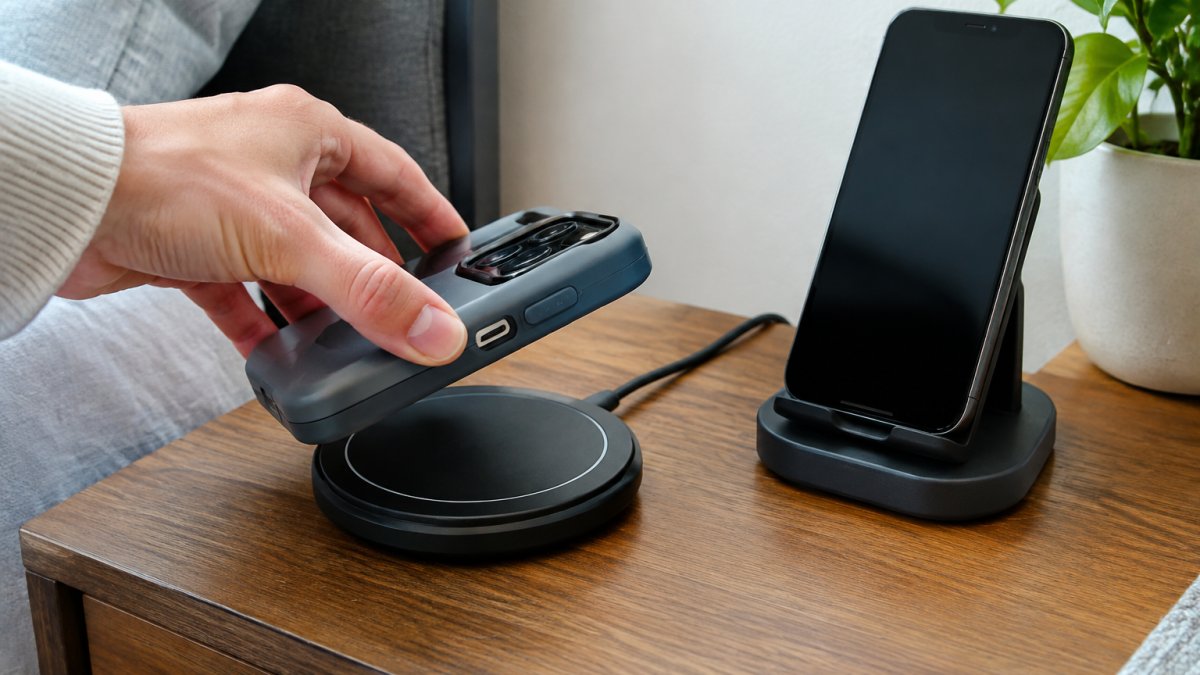
What blocks the coil:
- Metal plates or magnetic mounts inside the case
- Cards tucked into a card slot, especially credit cards with chips
- Thick rugged cases with layered shells
- Pop sockets and grips placed over the coil area
The fix is simple. Remove the case and test the pad. If charging starts, the case is the problem. Swap to a slim case or a case rated for wireless charging.
Alignment matters too. The charging coil in your phone must sit over the coil in the pad. A case that shifts the phone slightly off-center can weaken or stop the charge.
Qi vs Qi2: Why the Charger Standard Matters
Qi is the wireless charging standard most phones and pads use.
The compatibility rules are simpler than the marketing suggests, and they run in one direction:
- A Qi phone on a Qi pad: works, at the pad's wattage, with manual alignment.
- A Qi phone on a Qi2 pad: works as a plain Qi charge. The magnets do nothing because the phone has no magnet ring, so you still align it by hand.
- A Qi2 phone on a Qi pad: works as a plain Qi charge. You lose the magnetic snap and any Qi2-only speed.
- A Qi2 phone on a Qi2 pad: works with magnetic alignment and the full Qi2 power profile, up to 15W in the base Qi2 spec.
So Qi2 is backward compatible in both directions for basic charging.
Where magnets actually matter: in a car, on a nightstand, and anywhere the phone gets bumped.
What Qi2 does not fix: case thickness, metal plates, and foreign objects still block charging on either standard. Magnets help alignment, not penetration.
Watch out: "Qi2 compatible" on a charger listing sometimes means the pad accepts Qi2 phones at Qi speeds.
If you are weighing charger types, our breakdown of whether GaN chargers are worth it for multiple devices explains how power delivery fits into a multi-device setup.
The compatibility rules between Qi and Qi2 run in one direction, and here is how each pairing behaves.
| Phone | Pad | What happens |
|---|---|---|
| Qi phone | Qi pad | Works at the pad's wattage, with manual alignment |
| Qi phone | Qi2 pad | Works as a plain Qi charge; magnets do nothing |
| Qi2 phone | Qi pad | Works as a plain Qi charge; no magnetic snap |
| Qi2 phone | Qi2 pad | Magnetic alignment and full Qi2 profile, up to 15W |
When Wireless Charging Fails: A Step-by-Step Diagnosis
When a supported phone will not charge, work through these steps in order. Most failures trace back to one of them.
- Test the pad with another device. If a second phone charges, the pad is fine.
- Remove the case. A metal plate or thick shell is the most common culprit.
- Check the power source. Use the adapter that came with the pad, not a low-power port.
- Re-center the phone. Move it slowly until charging starts.
- Clean the pad and phone back. Dust and lint block contact.
- Check for heat. A hot phone may pause charging until it cools.
- Try a different cable. A failing cable can cut power to the pad.
Watch out: cheap cables and adapters are a frequent cause of charging that starts and stops. Our guide on whether it is safe to use cheap charging cables explains what to check before you blame the pad.
If all seven steps fail, the phone's coil may be damaged. That needs a repair, not a new charger.
Frequently Asked Questions
Does wireless charging work with every phone?
No. A phone needs built-in wireless charging capability or an add-on receiver to charge on a pad. Many older phones do not support wireless charging at all, but receivers and special cases can make many phones compatible. Check your phone's specs for Qi or Qi2 support before buying a charger.
How can I tell if my phone supports wireless charging?
Look up your exact model in the manufacturer's spec sheet and search for Qi, Qi2, or wireless charging. You can also place the phone on a Qi-certified pad: if it starts charging without a cable, it is compatible. A phone that does nothing on the pad either lacks the feature or has a case that is too thick for the coil to reach.
Will a phone case stop wireless charging?
Thin cases usually allow wireless charging to pass through, but thick, metal-backed, or wallet-style cases can block the coil and stop the charge. Remove the case and try again if the phone does not charge. Cases marketed as wireless-charging compatible are the safest choice when you want to leave the case on.
Can you add wireless charging to a phone that does not support it?
Yes. A wireless charging receiver, often a slim patch that plugs into the charging port or fits under a case, adds the capability to a phone without built-in support. These accessories can enable the feature on many phones without built-in support. Expect slower charging than a built-in coil and check that the receiver matches your phone's port.
Wireless charging is a hardware feature, and the good news is that adding it is easier than most people expect. If you want one charger that handles your phone, watch, and earbuds without a tangle of cables, Jackie's Attic carries folding 3-in-1 stations with magnetic alignment, a Qi-certified design, and temperature and voltage protection built in. Browse the charging collection and pick the setup that fits your nightstand or desk.


