


Last Updated: November 9, 2026
Quick Summary
To tell if a charging cable supports fast charging, check the plug housing for printed wattage ratings like 60W, 100W, or 240W and look for an E-Marker chip in the listing or packaging. You can also test it at home by charging from 20% for 15 minutes with two cables and comparing results.
- A cable with no wattage marking is usually a basic cable built for slow charging.
- USB-C to USB-C cables must support at least 20V/3A, or 60W, to meet the spec.
- Search the cable model number in the USB-IF integrators list to verify certification.
- Test each cable twice, starting from the same 20% battery level.
- Stop using any cable with exposed wire, a cracked sheath, or a hot connector.
Table of Contents
- Check the Cable for Wattage and E-Marker Markings
- USB-IF Certification Explained
- How to Test Charging Cable Speed at Home
- The Difference Between Data and Charging Cables
- Does Cable Thickness Actually Affect Charging Speed?
- Safety Checks: When to Stop Using a Cable
- Pick a Fast Charging Cable That Fits Your Setup
- Frequently Asked Questions
Check the Cable for Wattage and E-Marker Markings
Most fast charging cables tell you what they can do, if you know where to look.
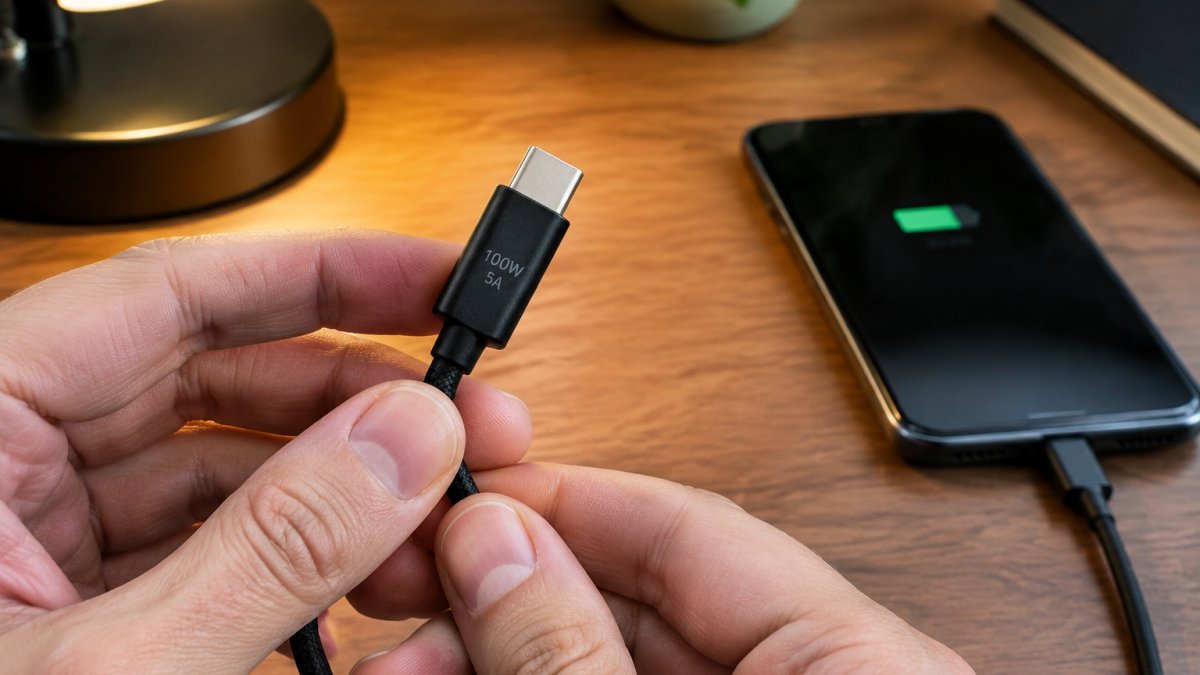
Start with the plug housing. Many cables print their rating right on the connector body. Look for numbers like 60W, 100W, or 240W. A cable with no marking at all is usually a basic cable built for slow charging.
Then check the listing or packaging for the word E-Marker. According to Unitek's guide to USB-C cable markings, cables rated for 65W, 100W, or 120W often carry an E-Marker chip to confirm their power delivery limits.
What the Numbers on the Connector Tell You
The number on the plug is the cable's maximum power rating. A 100W cable can carry up to 100W. A 60W cable caps out at 60W, even if your charger pushes more.
Match that number to your charger and device. If your charger outputs 65W but your cable is rated 20W, you get slow charging. The cable becomes the bottleneck.
One more detail: USB-C cables with USB-C connectors on both ends must support at least 20V/3A to meet the spec, per EEVblog Forum discussion of USB-C compliance. That works out to 60W minimum. Anything less is out of spec.
USB-IF Certification Explained
USB-IF certification is an official stamp from the group that sets USB standards. A certified cable has passed testing for power delivery, data speed, and safety.
Certified fast chargers also need Programmable Power Supply (PPS) support, according to r/Android community discussion of PPS requirements. PPS lets the charger adjust voltage in small steps for faster, cooler charging.
Here is what to check, in order of reliability:
- USB-IF product database listing, search the cable model number in the USB-IF integrators list; a real certification appears there with the vendor name and product details
- USB-IF logo on the packaging or product listing, necessary but not sufficient, since logos are easy to copy
- Certified cable listing that matches the exact model you are buying, not just the brand
- PPS support listed in the charger specs, not the cable specs
- Wattage rating that matches your device and charger
A common pattern is that marketplace listings show a USB-IF logo but no model number, which makes database verification impossible. Treat that as unverified.
What Certification Actually Tests
USB-IF compliance testing covers electrical characteristics (voltage drop, current capacity), mechanical durability of the connector, and interoperability with other certified devices. A certified 100W cable has been tested to carry 100W without exceeding temperature limits. An uncertified cable may still work, but you have no independent evidence of its limits.
Watch out: a cable can be certified for data but not for high wattage, so check the specific rating in the database entry rather than assuming certification covers every capability.
Connector-Specific Certification Notes
Certification details differ by connector type. USB-C to USB-C cables have the clearest public spec: cables with USB-C connectors on both ends must support at least 20V/3A to meet the spec, per EEVblog Forum discussion of USB-C compliance. That works out to 60W minimum. Anything less is out of spec. USB-A to USB-C cables are not required to carry the same power, and many top out at lower wattage regardless of certification.
How to Test Charging Cable Speed at Home
You can test a cable's real speed in about five minutes with gear you already own.
Here is the process:
- Drain your phone to about 20%.
- Plug in with Cable A and your fast charger.
- Note the battery percentage after 15 minutes.
- Repeat with Cable B, starting from the same 20%.
- Compare the two results.
A true fast charging cable will add noticeably more charge in the same window. If both cables perform the same, your charger or phone may be the limit, not the cable.
For a more precise read, use a USB power meter. These small inline devices show live voltage and current. Multiply volts by amps to get watts. A cable carrying 9V at 3A is delivering 27W.
Test each cable twice.
The Difference Between Data and Charging Cables
Charging cables and data cables are not the same thing. A charging cable moves power. A data cable moves power and information, and its internal wiring decides which jobs it can handle.
Some cheap cables skip the data wires entirely. They charge fine but cannot transfer files or run fast-charging negotiation that depends on data communication. That is why a cable can feel "fast" on one phone and slow on another.
Signs you have a data-capable cable:
- The listing mentions a data speed, such as 480 Mbps or 10 Gbps
- The cable works for file transfer to a laptop
- It carries an E-Marker chip for higher wattage
If you travel a lot, durability matters as much as speed. Our guide to durable USB-C cables for travel covers which builds hold up to daily bag life.
Does Cable Thickness Actually Affect Charging Speed?
Thicker cables often support higher power, but thickness alone proves nothing. Fast charging cables tend to be thicker because higher amperage needs more copper, per PCM Cable's notes on high-amperage cable design. Still, a thick cable with no rating can be all jacket and little copper.
The contrarian take: do not judge a cable by feel. Judge it by markings, certification, and a real speed test. A slim, well-built 100W cable will beat a fat unrated one every time.
What actually matters inside the cable:
- Copper gauge: thicker wire carries more current with less heat
- E-Marker chip: confirms high-wattage support
- Strain relief: protects the bend point near the connector
- Shielding: keeps power delivery stable
Safety Checks: When to Stop Using a Cable
Stop using a cable the moment you see exposed wire, a cracked sheath, or a connector that gets hot during charging. Those are signs the insulation has failed, and continuing to use it risks a short circuit or damage to your device.
Run this quick check every few weeks:
- Inspect both connector ends for fraying or splitting
- Feel the plug after 10 minutes of charging (warm is fine, hot is not)
- Wiggle the cable near the plug and watch for charging dropouts
- Check for bent pins or a loose fit in the port
- Toss any cable with exposed wire immediately
A common mistake is taping over a split sheath and calling it fixed. Tape slows the damage but does not restore safety. If the wire itself is exposed, replace the cable. Our article on whether cheap charging cables are safe walks through the risk signs in more detail.
Prevention Versus Repair: Know Which Job You Are Doing
Most cable-protection advice online blurs two different jobs. Keep them separate:
- Prevention applies to an intact cable. Adding a spring, silicone protector, or tape wrap before any damage occurs reduces bending stress at the connector and extends the cable's life. These methods work by spreading force over a longer section of jacket.
- Repair applies to a cable that is already damaged. Tape or putty over a split sheath is cosmetic at best. It does not reconnect broken strands, restore insulation ratings, or make the cable safe for high-wattage charging. Reinforcement is not a repair.
If the cable still charges reliably and the damage is only a cosmetic scuff on the outer jacket, a protector can slow further wear. If charging drops out when you wiggle the plug, the conductor is already compromised, replace the cable.
Connector-Specific Strain Relief Guidance
Strain relief needs differ by connector type, and a protector that fits one may obstruct another:
- USB-C: the oval connector seats deeply, and a thick silicone boot can prevent full insertion, causing intermittent charging. Choose a low-profile protector that stops behind the plug housing, not over the contact area.
- Lightning: the exposed contact pins are short, so any wrap that creeps onto the metal tip will block the connection. Keep tape and putty behind the rigid housing.
- USB-A: the larger housing gives more room for a spring or tape wrap, but the cable exit is often the weakest point because the housing is molded rigidly to the jacket.
- Micro-USB: the small connector is the most fragile; a spring wrapped too tightly can crack the housing, so use a flexible protector rather than rigid reinforcement.
Watch out: a protector that makes the plug fit loosely in the port is worse than no protector, because a loose connection arcs and heats up.
When Reinforcement Is Not Enough
Reinforcement is not a safe repair for internal damage. Replace the cable if you see any of these:
- Charging stops or restarts when the cable is moved
- The plug or connector is noticeably hotter than the same cable was when new
- The sheath is split far enough to show colored wires or bare copper
- The connector housing is cracked or the plug wobbles in the port
A cable that fails any of these checks is a hazard, not a project.
Pick a Fast Charging Cable That Fits Your Setup
The right cable depends on how many devices you charge and where. A single high-wattage USB-C cable suits one phone and one laptop.
At Jackie's Attic, we stock options built for exactly that. The Upgraded Multi Charging Cable is a 4-in-1 design with a magnetic wireless Apple Watch charger and USB-C charging, in a 4FT length.

The 3-in-1 LED Fast Wireless Charger Stand is a foldable station with a dual-coil design and Qi-certified safety features.
Here is how the two compare:
| Option | Best For | Price |
|---|---|---|
| Upgraded Multi Charging Cable | Travel and commuting | $50.71 |
| 3-in-1 LED Fast Wireless Charger Stand | Nightstand and desk | $15.06 |
Best for: shoppers who want one cable or stand to cover several devices. Skip if: you only charge a single phone and already own a rated USB-C cable.
Sorting real fast charging gear from lookalikes takes five minutes of checking markings and one quick speed test. Jackie's Attic carries multi-device charging cables and foldable wireless stations that skip the guesswork, with E-Marker-ready USB-C power and built-in safety features like temperature control and short-circuit protection. Get started with Jackie's Attic and build a charging setup that keeps every device topped up.
Frequently Asked Questions
How can I tell if my USB-C cable supports fast charging?
Look for wattage markings like 60W, 100W, or 240W printed on the connector housing, and check for an E-Marker chip listing. A compliant USB-C to USB-C cable must handle at least 20V/3A (60W). If there are no markings and the cable came bundled with a cheap accessory, assume it is a basic cable. Pairing a marked cable with a USB Power Delivery charger is what actually delivers fast charging to your phone.
Does the thickness of a charging cable affect charging speed?
Thicker cables often carry higher amperage because heavier wire gauges reduce resistance, but thickness alone is not a reliable indicator. Some slim cables with an E-Marker chip support 100W, while some thick cables are limited to 15W. Use the printed wattage rating and the E-Marker as your guide, and treat thickness as a secondary clue rather than proof of fast charging capability.
Can a bad cable prevent fast charging?
Yes. A damaged or low-rated cable can bottleneck the whole setup. If the cable lacks the power rating your charger supports, or if the internal wires are frayed, the phone will fall back to standard 5V charging. Swap in a known fast charging cable and compare charge times. If speed returns, the original cable was the limit, not your wall adapter.
What is the difference between a data cable and a charging-only cable?
A charging-only cable carries power but has no data wires, so it will not transfer files or support features like fast-charge negotiation on some protocols. A data cable includes the data lines and often the E-Marker chip needed for USB Power Delivery. For fast charging, use a cable rated for the wattage your device needs, and check the listing or markings to confirm it supports power delivery, not just data sync.


