


Last Updated: October 22, 2026
Quick Summary
Durable USB-C cables travel through packed bags and repeated bending without fraying or losing connection when they feature braided nylon jackets, reinforced connectors with strain relief, and a bend-cycle rating of 10,000 cycles or higher. Match the cable's wattage to your charger's per-port output, choose 3-foot or 6-foot lengths depending on your trip, and coil loosely with a velcro strap to extend lifespan.
- Braided nylon jackets resist punctures and cold cracking better than plastic; metal-reinforced connectors stay tight through hundreds of insertions.
- A 10,000+ bend-cycle rating survives years of travel; below 5,000 cycles may fail within a year.
- Delivered wattage equals the lowest of charger output, cable rating, and device input; upgrading only the cable rarely increases charging speed.
- Carry both 3-foot and 6-foot cables: 3-foot fits pockets for plane seats, 6-foot reaches outlets in hotel rooms and lounges.
- Loose coiling with a velcro strap is the single biggest lifespan extender; tight wrapping around a charger work-hardens copper near the connector.
Table of Contents
- What Makes a USB-C Cable Durable for Travel
- USB-C Cable Wattage for Laptop Charging
- USB-C Cable Length Guide for Travelers
- USB-C Cable Data Transfer Speeds
- USB-C Cable Durability and Lifespan
- Common Mistakes When Buying Travel USB-C Cables
- How to Pack and Care for Your Cable
- Frequently Asked Questions
What Makes a USB-C Cable Durable for Travel
On a trip, your USB-C cable gets thrown into bags, wrapped around chargers, and bent at angles no cable should endure. Durable USB-C cables travel through that chaos without fraying, cracking, or losing connection.
What separates a cable that lasts three months from one that lasts three years: connector reinforcement and jacket material.
Bend and flex durability matter most
Cables fail at the connector, where flexibility meets rigidity.
Braided nylon jackets outperform plastic: they resist punctures, don't crack in cold, and bounce back after being crushed in a backpack. Flat designs coil more predictably and resist kinking.
Check the bend cycle rating: 10,000+ cycles survives years of travel packing; below 5,000 may fail within a year.
Connector strength and strain relief
The USB-C connector is the weak point: eight internal pins handle power and data, and they break if the connector wiggles. Strain relief prevents that movement.
Look for a reinforced housing that doesn't flex on insert or removal. Metal-reinforced connectors stay tight through hundreds of insertions; plastic ones loosen within months.
Repairability matters too: some cables have replaceable connectors, so a failure means swapping one part instead of the whole cable.
USB-C Cable Wattage for Laptop Charging
Wattage is where most travel cable purchases go wrong. A 240W cable, a 100W charger, and a 65W laptop charge at 65W, the highest number doesn't guarantee faster charging.
How USB Power Delivery actually negotiates
USB-C charging uses the USB Power Delivery (USB PD) protocol: charger and device negotiate a voltage and current pair, and the cable must be rated to carry it safely.
- Standard cables are rated for 3A: 15W at 5V, 27W at 9V, 45W at 15V, 60W at 20V, hence the common 60W ceiling.
- Electronically marked (e-marked) cables contain a chip that tells the charger and device the cable's rating. A 5A e-marked cable carries 100W at 20V; cables above 60W are generally e-marked because the protocol requires it for safety.
- Extended Power Range (EPR) cables support up to 48V and 5A (240W), but require an e-marked cable plus a charger and device that both support EPR. A 240W cable does not make a 100W charger deliver 240W.
The practical rule: delivered wattage is the lowest of the charger's output, the cable's rating, and the device's accepted input. Upgrading only the cable rarely increases charging speed.
60W, 100W, 140W, and 240W in practice
- 60W (3A) cables cover phones, tablets, and small laptops and are the lightest, most packable option. They will charge a 100W laptop slowly or not at all under load.
- 100W (5A, e-marked) cables are the workhorse for most modern laptops. If your laptop ships with a 65W or 96W charger, a 100W cable matches it with headroom.
- 140W cables are e-marked and EPR-capable, and matter if you travel with a 140W-class laptop charger. For a 100W laptop, a 140W cable adds headroom but not speed.
Matching wattage to your devices
Check three things before buying:
- The charger's output. Read the fine print, a 100W charger may deliver only 65W on one port when two are in use.
- The device's accepted input. Phone fast charging tops out around 20-30W, thin laptops at 45-65W, performance laptops at 100W or more.
- The cable's rating. If it isn't e-marked and rated for 5A, assume 60W maximum.
A common travel pattern: one 100W or 140W e-marked cable plus a multi-port GaN charger that splits power across laptop, phone, and tablet.
Travel scenarios where wattage matters
- Airport and lounge charging. Public USB outlets deliver low wattage; a 100W cable won't speed up a 5V/2.4A outlet. Carry your own charger.
- Power banks. Many output 30W or 45W on USB-C, so the bank sets the ceiling regardless of cable rating.
- Hotel and train outlets. Outlet placement varies, so a longer 100W cable beats a higher wattage rating here.
When higher wattage is worth the price
Buy a 100W or 140W e-marked cable if you travel with a 65W+ laptop and want one cable for everything. Buy 240W EPR only if you own EPR-capable gear.
The goal is a cable rated at or above the highest per-port output you will actually use, with an e-marker so the charger and device can negotiate safely.
USB-C Cable Length Guide for Travelers
Cable length affects practicality and durability: too short forces awkward angles, too long tangles in your bag.
Short cables for bags and pockets
A 3-foot cable fits in a pocket or small pouch and is right for charging at your seat on a plane or at a gate. The downside: you must sit close to the outlet or power bank.
Long cables for airport lounges and hotel rooms
A 6-foot cable lets you charge a laptop on a desk from the bed, or reach outlets in odd lounge locations. Worth it for week-long trips, not weekend ones. Many travelers carry both, 3 feet for daily packing, 6 feet for the hotel room.
USB-C Cable Data Transfer Speeds
Not all USB-C cables handle data equally: some are charge-only, others support USB 3.1 or USB4. If you transfer files between laptop and external drive, cable speed matters.
USB 2.0, USB 3.1, and USB4 standards
USB 2.0 runs at 480 Mbps (60 MB per second), slow for large files but fine for most travel.
USB 3.1 reaches 10 Gbps (1.25 GB per second), the standard for modern laptops and external drives; photo and video backups get dramatically faster.
USB4 reaches 40 Gbps and supports 8K video output, future-proof for video work or high-end displays.
When fast data transfer matters for travel
For photographers and videographers, a day's footage takes minutes with USB4 and hours with USB 2.0. For email, browsing, and streaming, charge-only cables are fine.
USB-C Cable Durability and Lifespan
Durable USB-C cables travel well when they survive at least two years of regular use; the best last five or more. But "durable" is a marketing word until you test it.
Travel-specific durability tests you can run at home
Most durability claims come from lab bend-cycle machines, not the inside of a carry-on. Approximate real-world stress with a few repeatable checks:
- The bend-cycle test. Hold the cable an inch behind the connector, bend it 90 degrees, then straighten, one cycle. Do 50 cycles per connector, then confirm the device still charges at full speed. A cable that stutters after 50 cycles will not survive a year of packing.
- The connector strain test. Plug the cable in, then gently wiggle the connector side to side while watching the charge indicator. Any flicker means the strain relief is not doing its job. Repeat after 100 insert/remove cycles to simulate a few months of daily use.
- The abrasion test. Rub the jacket against the rough side of a hook-and-loop fastener or a zipper 20 times. Braided nylon shows minimal fraying; PVC and rubber scuff and can expose the inner braid.
These aren't a lab substitute, but they surface the failure modes that end a travel cable's life: connector strain, jacket abrasion, and cold-weather cracking.
What travel does to a cable that home use does not
At home a cable sits on a desk; in a bag it's compressed by a laptop, water bottle, and shoes, then yanked out by the connector. Three stresses dominate:
- Connector-side bending. A short, stiff strain relief concentrates stress where wires meet pins. Look for one at least half an inch long that tapers gradually.
- Jacket abrasion against zippers and hard shells. Braided nylon resists this; smooth TPE and PVC don't. A soft-lined cable pocket cuts abrasion sharply.
- Repeated tight coiling. Wrapping a cable around a charger work-hardens the copper near the connector. Loose coiling with a hook-and-loop strap is the single biggest lifespan extender.
Materials and construction that hold up
- Braided nylon over TPE is the most common durable combination. The braid resists abrasion and the TPE core stays flexible in cold.
- Flat cables coil predictably and resist kinking, but the flat jacket can delaminate at the connector if the strain relief is weak. Check that the flat section transitions smoothly into a reinforced connector housing.
- Metal connector housings outlast plastic ones because they do not flex or crack at the seam. They also maintain insertion force longer, which matters when a loose connection causes intermittent charging.
Warranty, repairability, and real cost of ownership
A one-year warranty covers manufacturing defects, not travel wear. A lifetime warranty signals confidence, but read the exclusions, many exclude "normal wear and tear," exactly how travel cables fail.
Repairability is rare but valuable: a few cables offer replaceable connector ends. If a connector fails after two years and a replacement end costs a few dollars, you've doubled the cable's life.
A $5 cable that fails every six months costs about $10 a year and strands you at the worst moment. A $20 cable that lasts four years costs $5 a year. The cheaper cable is the more expensive one over a trip-heavy year.
Common Mistakes When Buying Travel USB-C Cables
Most travelers make the same mistakes: buying the cheapest option, ignoring wattage, or picking a length that doesn't fit their use. A $5 cable likely fails within months, and replacing it costs more than one $20 cable that lasts years. Ignoring wattage means a laptop that won't charge when you need it. Carry both a 3-foot and a 6-foot, and if you work with files, USB 3.1 or USB4 is worth the extra cost over charge-only.
How to Pack and Care for Your Cable
Proper packing extends cable lifespan dramatically: a loosely coiled cable outlasts one wrapped tightly around a charger.
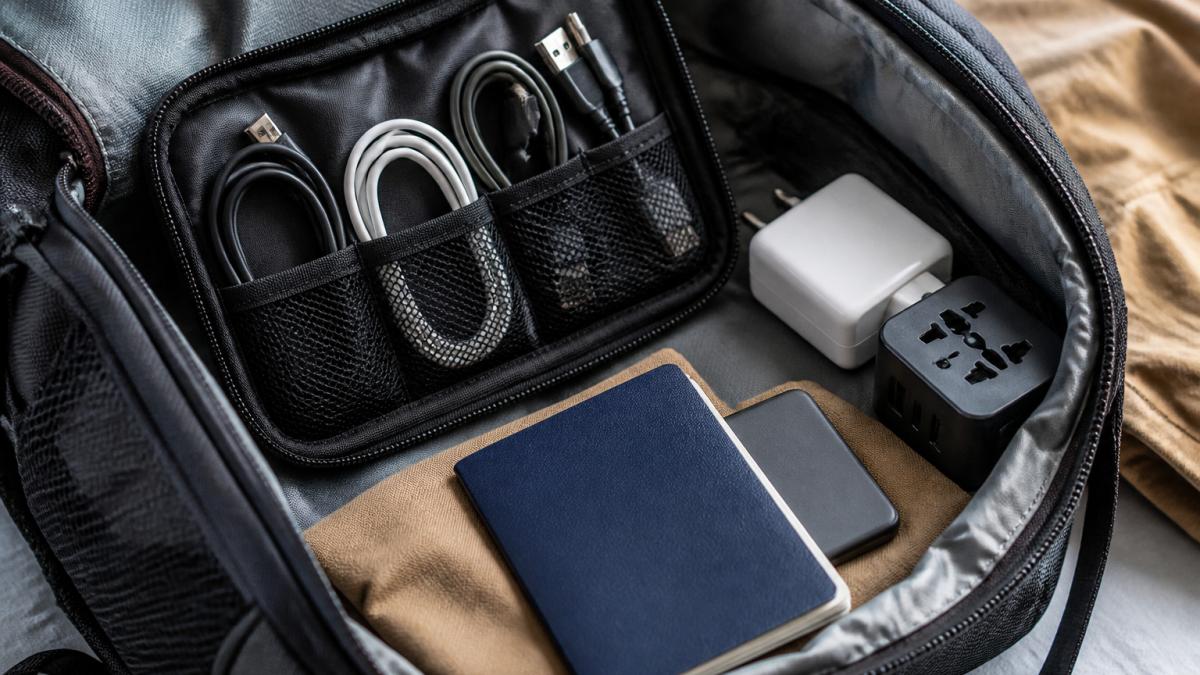
Use a cable organizer pouch or small zippered bag to prevent tangling and punctures. Coil loosely, tight coils create stress points.
Choosing the right USB-C cable for travel comes down to durability, wattage, length, and data speed. Look for braided nylon jackets, reinforced connectors, and wattage that matches your devices.
| Cable Type | Best For | Wattage | Length | Data Speed |
|---|---|---|---|---|
| Budget option | Phones and tablets | 60W | 3 feet | USB 2.0 |
| Travel standard | Most devices | 140W | 3 feet | USB 3.1 |
| Versatile setup | Laptop and phone | 140W | 6 feet | USB 3.1 |
| Premium choice | Future-proof | 240W | 3-6 feet | USB4 |
Frequently Asked Questions
What should I look for in a durable USB-C cable for travel?
Prioritize braided or nylon-reinforced materials, strain relief at both connectors, and a cable that flexes without kinking. Test the connector fit in your devices before buying, loose connections fail faster. Look for cables rated for at least 10,000 bend cycles, and check the warranty. Short cables (3-6 feet) pack better; long cables (10+ feet) work in hotel rooms and airports.
How many watts should a travel USB-C cable support?
A 60W cable handles most phones and tablets. If you charge a laptop, check its power requirements: ultrabooks need 60-100W, while larger laptops may need 140W or 240W. A 140W cable works universally and weighs the same as a 60W cable, making it the practical choice for mixed-device travel. Excess wattage doesn't harm devices, the charger and device negotiate the actual power draw.
Are braided USB-C cables more durable?
Yes. Braided nylon or fabric-wrapped cables resist fraying and kinking better than bare rubber during repeated coiling and uncoiling. They also feel more premium and hide wear longer. Downside: braided cables cost more and may be slightly thicker. Flat cables offer a middle ground, they pack thin but are less flexible and prone to creasing.
What USB-C cable length is best for travel?
Carry two: a 3-6 foot short cable for charging phones in your bag or car, and a 10-15 foot long cable for hotel rooms and airport lounges where outlets are far from seating. Short cables reduce tangle, fit in pockets, and cost less. Long cables give flexibility in unfamiliar spaces. Skip ultra-short keychain cables, they're gimmicks that rarely work reliably.


