


Table of Contents
- Quick Comparison: Best Space Saving Charging Stations
- How We Picked the Best Space Saving Charging Stations for Small Desks
- 1. 3 In 1 LED Fast Wireless Charger Stand Foldable Charging Station: The Desk Footprint Winner
- 2. 3-in-1 Folding Wireless Charger: The Best Space Saving Charging Station for Travel and Small Desks
- 3. Upgraded Multi Charging Cable for Apple Watch Charger 4 in 1: The Cable Management Hero
- Cable Management Tips for Small Desks
- Why Buy 3 in 1 Foldable Wireless Charger for Your Small Desk?
- Conclusion: Pick the Right Space Saving Charging Station for Your Desk
- Frequently Asked Questions
Last Updated: September 27, 2026
Quick Comparison: Best Space Saving Charging Stations
A small desk forces a trade-off: every device needs power, but every charger eats your work surface. That is the problem space saving charging stations solve. At Jackie's Attic, we offer charging solutions designed to fit various desk sizes, because a charger that works on a big home office desk often becomes a nuisance on a smaller apartment desk.
Here is the short version before the detail:
| Pick | Price | Footprint | Charges at Once | Best For |
|---|---|---|---|---|
| 3 In 1 LED Fast Wireless Charger Stand | $15.06 | Foldable, 168 x 145 x 30 mm packed | Phone, watch, earbuds | Tightest desks, lowest cost |
| 3-in-1 Folding Wireless Charger | $26.16 | Folds flat for storage | Phone, watch, earbuds | Travel and dual-use desks |
| Upgraded Multi Charging Cable 4 in 1 | $50.71 | 4 ft cable, no dock | Phone, watch, plus two more | Cable clutter cleanup |
The pattern: if surface area is your bottleneck, a folding stand wins. If you move between desk and bag, the folding pad wins.

How We Picked the Best Space Saving Charging Stations for Small Desks
When considering charging solutions, a key question is how much usable desk space it provides. A charger can have many ports and still be unsuitable if it takes up too much workspace.
1. 3 In 1 LED Fast Wireless Charger Stand Foldable Charging Station: The Desk Footprint Winner
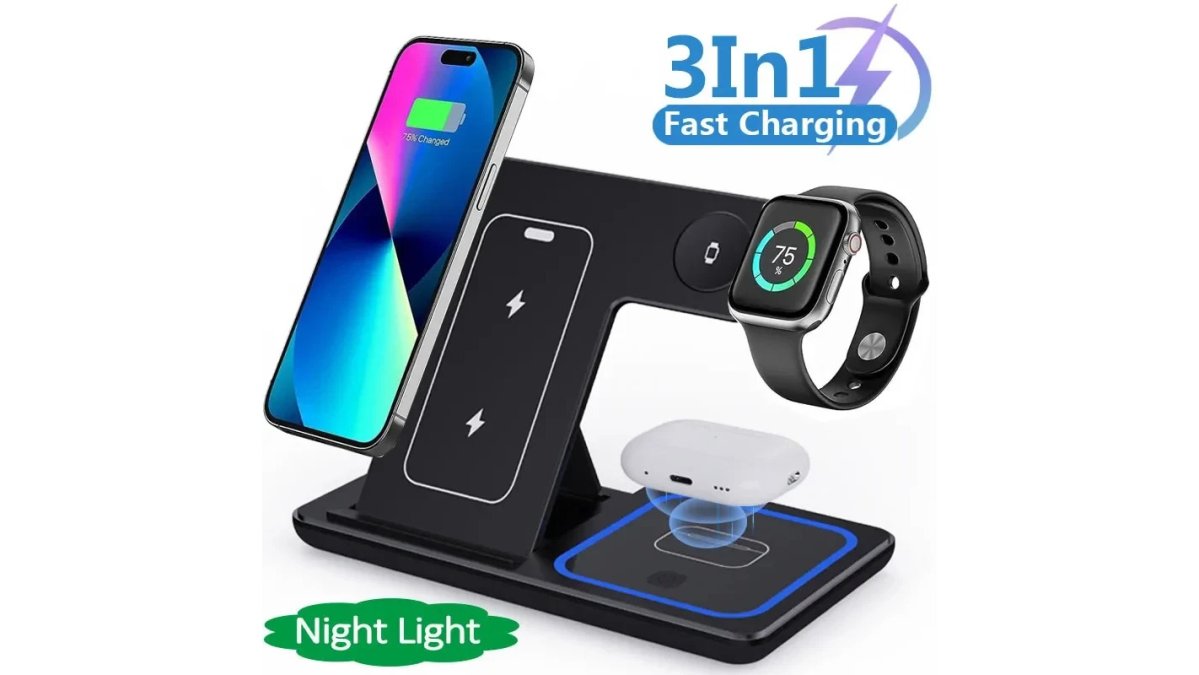
This is the pick for anyone whose desk is too small for a dock. It folds to 168 x 145 x 30 mm, stores flat, and opens only when needed. At $15.06, it offers a competitive price.
Real-World Desk Footprint and Specs
The dual-coil design matters most here. Single-coil pads force you to hunt for the charging sweet spot, which sounds trivial until you do it forty times a week. Dual coils mean you set the phone down and it charges, no repositioning.
Cooling and Safety Features
Pros: Folds flat for storage; lowest price in this roundup; dual coils remove the alignment guesswork; Qi-certified with active cooling. Cons: Plastic body, not metal; three devices maximum, so a fourth phone still needs a cable.
2. 3-in-1 Folding Wireless Charger: The Best Space Saving Charging Station for Travel and Small Desks
If you want a 3 in 1 foldable wireless charger that earns its place in two locations, this is it. It folds for storage and travel, then unfolds into a stand with an adjustable bracket.

3. Upgraded Multi Charging Cable for Apple Watch Charger 4 in 1: The Cable Management Hero
Sometimes the space problem is not the dock but the nest of cables behind it. This 4-in-1 cable replaces four charging cords with one 4-foot run, which can help clear a small desk's rear edge.
Cable Management Tips for Small Desks
Cable clutter makes a small desk feel smaller: the surface can be clear and the desk still reads as chaotic because of what happens behind and beneath it. Most guides stop at "use clips and velcro," which does not tell you how much clearance you need or where a charging station's cable should go on a 40-inch desk.
How Much Clearance a Charging Station Actually Needs
A folding stand like the 3 In 1 LED Fast Wireless Charger Stand measures 168 x 145 x 30 mm packed. Open and charging a phone, watch, and earbuds, plan for roughly 6 to 7 inches of depth and 5 to 6 inches of width, plus about 0.5 inch of open air behind the unit so the rear vents are not blocked.
3 In 1 LED Fast Wireless Charger Stand →
A Routing Path That Works on a Narrow Desk
A common pattern that holds up on desks under 48 inches wide:
- Mount a single power strip under the desk near the back edge, so wall adapters leave the surface entirely.
- Run the charging station's USB-C cable straight back, then down the rear edge, using right-angle connectors where it bends sharply behind a monitor.
- Anchor the run with adhesive clips every 6 to 8 inches so it does not sag into your leg space.
- Keep one short cable in a drawer for travel instead of coiled on the surface.
- Label both ends of every cable you keep, so you never unplug the wrong one.
Why Buy 3 in 1 Foldable Wireless Charger for Your Small Desk?
A folding 3-in-1 charger offers benefits such as flat storage, charging three daily devices at once, and helping to manage cable clutter in a compact workspace.
Thermal Management on a Cramped Surface
Heat can impact compact chargers. A folding stand that opens vertically can expose more surface area to open air than a flat pad, which may help with heat dissipation during charging. The 3 In 1 LED Fast Wireless Charger Stand addresses this with ventilation holes on the back, plus temperature control, voltage protection, and short-circuit prevention. It's advisable to leave at least a finger's width of clearance behind any compact charger, and avoid stacking one on a running laptop or under a closed monitor riser, as blocking the vents can trap heat.
Ergonomic Integration With Standing Desks and Monitor Arms
Most guides ignore how a charging station fits a specific desk setup. On a standing desk, a folding stand can sit on the surface while raised and still be reached without stretching. On a desk with a monitor arm, the clamp and base already claim the back edge, so the charger must fit beside them rather than behind them. Measure the gap between the monitor arm's base and the desk's side edge before buying; a folding stand packing to 168 x 145 x 30 mm fits a gap a rigid dock will not.
Repairability and Longevity
Repairability can be a consideration for small desks. Folding 3-in-1 docks with standard USB-C input can be a practical choice, as a frayed cable might be easily replaced. Proprietary connectors can make replacing a worn cable more difficult. When comparing models, checking the input port can be useful.
When a Cable Beats the Dock
Multi-device charging can streamline your routine by allowing you to charge multiple devices on one pad. The choice between a dock and a cable solution can depend on the number of devices you charge daily. For three or more devices, a dock might be a suitable option; for one device, a cable might be sufficient. The Upgraded Multi Charging Cable 4 in 1 can be a solution for managing cords.
Conclusion: Pick the Right Space Saving Charging Station for Your Desk
The hard part is not finding a charger with enough ports, but one that gives back more desk than it takes, and that calculation differs for every workspace.
Frequently Asked Questions
What are the best space saving charging stations for a small desk?
For a small desk, prioritize vertical or foldable designs that take up little surface area. The 3 In 1 LED Fast Wireless Charger Stand Foldable Charging Station is a strong pick because it folds flat and measures 168 x 145 x 30 mm when packed. The 3-in-1 Folding Wireless Charger is another compact option that charges a phone, watch, and earbuds at once. Both cut cable clutter and keep your workspace tidy.
How do I choose a charging station for a small desk?
Measure your available desk space first, then look for chargers that match your devices. Check the wattage output and charging protocol to ensure fast charging. A foldable or vertical stand saves the most room. Also consider cable management: a station with a single USB-C input and built-in cable routing keeps things neat. The 3-in-1 Folding Wireless Charger supports PD and magnetic charging, making it a versatile choice for small desks.
Can multi-device charging stations help reduce cable clutter?
Yes. A multi-device charging station replaces several individual chargers and cables with one unit. For example, the 3 In 1 LED Fast Wireless Charger Stand charges three devices wirelessly, so you only need one USB-C cable. This reduces the number of cords on your desk and makes it easier to keep your workspace organized. Pair it with cable management tips like adhesive clips or a cable box for the best results.
Are vertical charging stands better for small workspaces?
Vertical charging stands use less horizontal space than flat pads, which is ideal for small desks. They also keep your phone at a readable angle for notifications. The 3 In 1 LED Fast Wireless Charger Stand Foldable Charging Station is a vertical stand that folds for storage. If you prefer a more portable option, the 3-in-1 Folding Wireless Charger also stands upright and folds flat when not in use.
What should I look for in a compact desk charger?
Look for a small footprint, foldable or vertical design, and compatibility with your devices. Check for safety features like temperature control, voltage protection, and short-circuit prevention. The 3 In 1 LED Fast Wireless Charger Stand includes these safeguards and is Qi-certified. Also consider the charging protocol, such as PD and magnetic charging. Finally, ensure the charger has a non-slip base to stay put on your desk.


