


Table of Contents
- Why Your Multi-Port USB Charger Takes Up Too Much Space
- The 3 in 1 Foldable Wireless Charger: A Space-Saving Alternative
- Benefits of GaN Technology in Chargers: Less Bulk, More Power
- How to Organize Charging Cables So They Stop Taking Over
- Power Output and Port Distribution: What Actually Matters
- Safety, Heat, and Long-Term Durability of Compact Chargers
- What to Ignore When Shopping for a Multi-Port USB Charger
- Conclusion
- Frequently Asked Questions
Last Updated: September 19, 2026
Why Your Multi-Port USB Charger Takes Up Too Much Space
Most people hunting for alternatives to bulky multi-port USB chargers are solving a problem they didn't create: they bought a power brick sized for a desk and tried to live with it on a nightstand or in a carry-on. The charger isn't too weak, it's just too big for where it sits.
A traditional multi-port USB charger packs a transformer, a power conversion board, and several USB-A ports into one housing that needs ventilation on every side, plus a cable for each device. Two phones, a watch, and earbuds means four cables fighting for the same six inches of counter.
You don't need more ports.
The 3 in 1 Foldable Wireless Charger: A Space-Saving Alternative
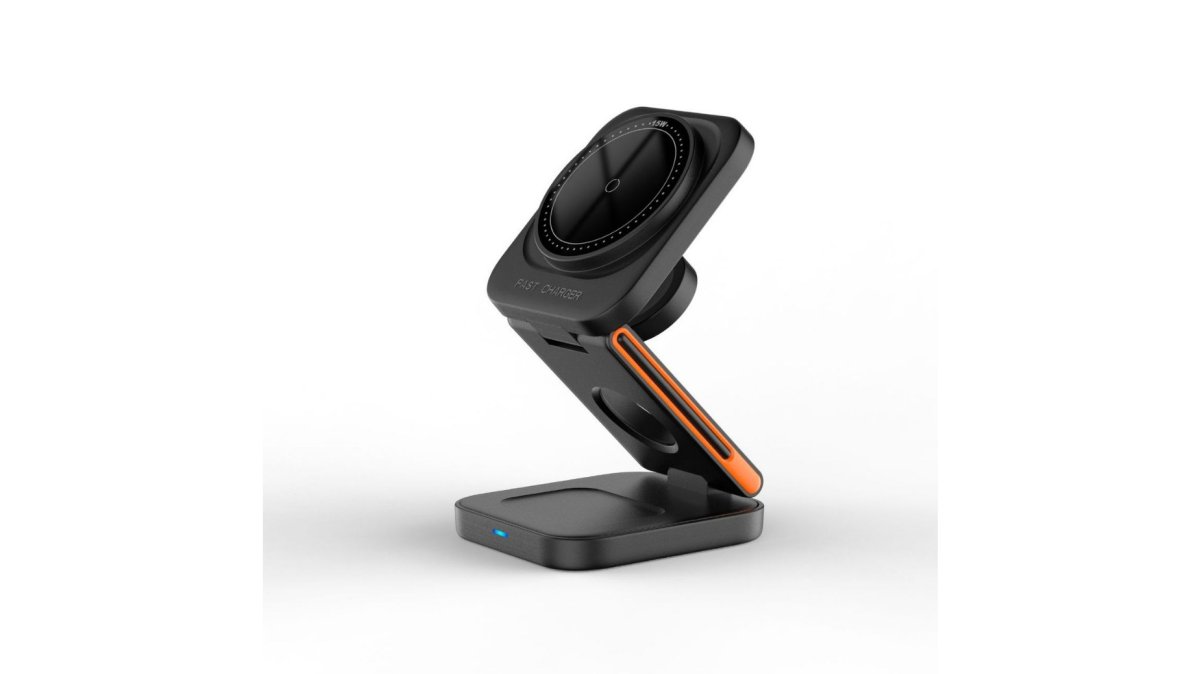
A 3 in 1 foldable wireless charger replaces several cables and a power brick with one flat pad that charges a phone, watch, and earbuds at once. The folding design collapses for storage and travel, then unfolds into a stand.

Benefits of GaN Technology in Chargers: Less Bulk, More Power
Gallium nitride is the reason modern chargers can be small without giving up wattage. GaN transistors switch power more efficiently than the silicon used in older bricks, so less energy is lost as heat. Less heat means less metal and plastic needed to dissipate it.
The weight-to-power ratio nobody talks about
Size gets the attention, but weight matters more in a carry-on. A legacy 65W silicon brick lands around 10 to 12 ounces, while a comparable GaN adapter typically comes in closer to 4 to 6 ounces, a difference that compounds across a laptop charger, a phone charger, and a backup brick in the same bag.
What GaN does not fix
GaN shrinks the power conversion stage, not the plug, cable, or port housing. A 100W GaN brick paired with a 60W cable will negotiate down to 60W, and the charger will feel like it underperformed when the cable was the bottleneck.
How to read a GaN spec sheet
- Look for wattage per port, not just the total. A "100W" GaN charger often splits to 65W + 30W + 5W when all three ports are active.
- Check whether the prongs fold, the biggest travel-space win after the GaN shrink itself.
- Confirm the cable is rated for the same wattage as the port you'll use. This is the most common cause of "slow charging" complaints on capable GaN units.
- Ignore the marketing word "GaN" alone. GaN is a component, not a guarantee; the per-port rating and safety certifications are what you rely on.
For anyone comparing alternatives to bulky multi-port USB chargers, GaN is the single biggest factor to look for. A GaN wall adapter with two or three USB-C ports handles a laptop, phone, and earbuds from one outlet, fits in a jacket pocket, and weighs roughly half the brick it replaces.
How to Organize Charging Cables So They Stop Taking Over
Cable clutter is the real reason a multi-port setup feels bulky, even when the charger is small. Fixing it takes about twenty minutes and costs almost nothing.
A simple approach that works:
- Label each cable at both ends with a small sticker or tape flag
- Route cables behind furniture using adhesive clips, not tape
- Coil and secure the cables you use only when traveling
- Keep one short cable per device instead of a long one that loops across the desk
- Move wireless-chargeable devices off cables entirely
Power Output and Port Distribution: What Actually Matters
Total wattage is the number shoppers fixate on, and it misleads most often. A charger rated at 65W rarely sends 65W to every port at once.
Here's how the split usually works:
| Charger Type | Typical Total Output | How Power Is Split | Best For |
|---|---|---|---|
| Single-port GaN adapter | 30-65W | All power to one device | Laptop on the go |
| Dual-port GaN adapter | 45-65W | Shared, drops when both active | Phone plus laptop |
| 3-in-1 wireless pad | 15-30W | Fixed per device | Nightstand, desk |
| Multi-port cable | Varies by host | Sequential, one at a time | Travel backup |
Safety, Heat, and Long-Term Durability of Compact Chargers
Compact chargers live or die on heat management, because cramming more power into less space leaves less room for error. That's why the certifications and protections matter more than the size.
3 In 1 LED Fast Wireless Charger Stand →
What actually degrades over 12 to 24 months
Two things happen inside a compact charger as it ages, at different rates.
How power distribution efficiency changes with age
A new multi-port charger splits its total wattage cleanly; an older one often doesn't. As capacitors age, the charger's ability to hold stable voltage under load drops, and the power allocation chip can behave inconsistently. A port that used to deliver 30W may now negotiate down to 18W, or a second device may cause the first port to drop further than it did when new.
How to extend the useful life
- Keep the charger out of enclosed spaces while it's working. Airflow is the single biggest factor in capacitor life.
- Use a cable rated for the port's wattage. An undersized cable makes the charger work harder and run hotter.
- Unplug the charger when it's not in use if it runs warm at idle. Some units draw a small standby current and stay slightly warm.
- Buy a charger with a replaceable cable rather than a fixed one. The cable is the part that fails first, and replacing a cable is far cheaper than replacing the charger.
- Avoid charging on soft surfaces like beds or couches, where vents get blocked and heat builds.
When to replace rather than repair
If a charger gets uncomfortable to hold, smells like hot plastic, or shows discoloration around the ports, stop using it, those are signs of internal failure, not normal wear. A charger that simply charges slower than it used to is a replacement candidate, not an emergency, but it signals the capacitors are aging.
Disposal and e-waste
When a charger finally dies, don't toss it in the trash. Many municipalities run household hazardous waste or e-waste drop-off programs, and retailers often accept small electronics for recycling, check your local waste authority's site for locations. Because GaN chargers use less material than the silicon bricks they replace, moving to one is a small reduction in the e-waste stream, but only if the old unit is recycled rather than landfilled.
What to Ignore When Shopping for a Multi-Port USB Charger
Most of the spec sheet is noise. Here's what to skip and what to check.
What to check instead:
- Per-port output, not just total wattage
- Whether the cable is replaceable
- Foldable prongs or a compact body for travel
- Safety certifications and heat protection features
- Real device compatibility, not a vague "works with most phones"
Conclusion
The best fix for a charger that hogs the counter isn't a bigger one. It's a smaller one plus fewer cables. Moving your phone, watch, and earbuds to a folding wireless pad removes the clutter at the source, and a compact GaN adapter handles the laptop when you need speed.
Frequently Asked Questions
What is the best USB multiport charger for small spaces?
For tight spaces, a foldable 3-in-1 wireless charger beats a traditional multi-port brick. The 3-in-1 Folding Wireless Charger from Jackie's Attic charges a phone, watch, and earbuds simultaneously on one compact pad, then folds flat for storage or travel. It supports fast charging and magnetic alignment, so you skip the cable tangle entirely. If you still need wired ports, look for a GaN-based adapter with a compact form factor rather than a full-size power brick.
Is it safe to use a multi-port charger for all my devices overnight?
Yes, provided the charger has proper safety features. Look for temperature control, overcurrent protection, and short-circuit prevention. The 3 In 1 LED Fast Wireless Charger Stand from Jackie's Attic is Qi-certified and includes voltage protection plus ventilation holes for heat dissipation. Cheap unbranded multi-port bricks often skip these safeguards, which is where overheating risks come from. Stick with certified chargers and avoid covering them while in use.
How can I charge multiple devices without a bulky power brick?
Swap the brick for a foldable charging station or a multi-device cable. A 3-in-1 foldable wireless charger handles three devices on one pad with no cables at all. If your devices need wired connections, a 4-in-1 multi charging cable consolidates Apple Watch, iPhone, and USB-C charging into a single 4-foot cord. Both options cut the outlet clutter that comes with separate adapters and cables for every device.
Do compact chargers last as long as larger multi-port models?
Compact chargers can last just as long when they use quality components and proper thermal management. Heat is the main killer of any charger, so ventilation and temperature control matter more than physical size. Keep chargers out of direct sunlight and unplug them when not in use to extend their lifespan.
What should I look for in a foldable 3-in-1 wireless charger?
Check four things: fast charging support (PD protocol), magnetic alignment for stable placement, safety certifications like Qi, and a foldable form factor for portability. The 3-in-1 Folding Wireless Charger from Jackie's Attic hits all four with 30W max output, magnetic suction, and a Type-C interface. Also confirm it fits your specific phone, watch, and earbuds models before buying, since wireless charging coils vary by device.


