


Table of Contents
- Step 1: Plan Your Power Budget and Pick the Right Spot
- Step 2: Check Wireless Charging Station Wattage Requirements Before You Buy
- Step 3: Set Up the Station and Align Your Devices
- Step 4: Manage Cables and Keep the Desk Clear
- The Best 3 in 1 Foldable Wireless Charger for Small Spaces
- Troubleshooting Wireless Charging Pads That Stop Working
- Conclusion
- Frequently Asked Questions
Last Updated: October 2, 2026
Step 1: Plan Your Power Budget and Pick the Right Spot
Setting up a wireless charging station for multiple devices starts with simple math, not shopping. Most people buy a pad first, then wonder why their tablet trickles along at a crawl. Flip that order and the project takes about ten minutes.

The math is called a power budget: the total wattage every device on the pad needs at the same time. Add those numbers up before you buy anything.
Here's what a typical household looks like:
- Phone: 15W to 20W for fast charging
- Smartwatch: 2W to 5W
- Wireless earbuds: 3W to 5W
- Tablet: 10W to 30W
Add a phone, watch, and earbuds and you're near 25W. That single number decides which charger you need.
The Math Most Guides Skip: Derating and Simultaneous Load
Here's the part almost no guide explains: a pad's advertised total output isn't the wattage that actually reaches your devices. Two losses eat into it:
- Coil-to-coil transfer loss. Inductive charging is roughly 70-80% efficient. A 15W coil delivers closer to 10-12W to the battery after the field crosses the gap and the phone's rectifier converts it back to DC.
- Shared-bus throttling. On a multi-coil pad, all coils draw from one adapter. When several devices land at once, the controller splits the wattage: a 30W pad might give 15W to the phone, 5W to the watch, and 5W to the earbuds, and drop the phone to 7.5W if a fourth device appears.
So the working rule is: size your adapter for the sum of per-device peaks, then add 20-30% headroom. A phone (20W) + watch (5W) + earbuds (5W) = 30W of demand, so you want a 40W adapter feeding a pad rated at least 30W total.
A quick way to run the numbers before you shop:
| Devices on the pad | Peak demand | Adapter to buy (with headroom) |
|---|---|---|
| Phone only | 20W | 30W USB-C PD |
| Phone + watch | 25W | 30W USB-C PD |
| Phone + watch + earbuds | 30W | 40W USB-C PD |
| Phone + watch + earbuds + tablet | 50-60W | 65W USB-C PD |
If you own a spare USB-C PD laptop adapter, check its wattage first, a 65W brick will happily run a 45W pad.
Picking the Spot
Nightstand, entryway table, or desk corner all work. Choose a flat surface within reach of one outlet, and avoid direct sunlight and heating vents, heat is the enemy of every charging pad, and three active coils generate more than one.
Step 2: Check Wireless Charging Station Wattage Requirements Before You Buy
Wireless charging station wattage requirements come down to one rule: the pad's total output must cover every device at once, plus headroom. Buy a 15W pad for a 25W load and something sits idle all night.
Check the label on the box. Look for two numbers:
- Total output - the combined wattage across all charging spots
- Per-spot output - what each individual coil delivers
A pad rated for 30W total might split it as 15W for the phone, 5W for the watch, and 5W for the earbuds. That's fine for those three. Add a tablet and you're over budget.
Qi-certified matters here too. Qi is the wireless charging standard that most phones and earbuds follow. A Qi-certified pad follows the same rules as your phone, so alignment and safety behave predictably. The Wireless Power Consortium's Qi standard overview explains how the certification works.
Matching Your Power Adapter to the Pad
The wall adapter is the part most people get wrong. A 30W pad needs a 30W adapter, minimum. Many pads ship without one.
Look for USB-C power delivery on the adapter label. PD adapters negotiate the right voltage automatically, so the pad gets what it asks for.
Quick check before checkout:
| Pad Total Output | Adapter You Need | What It Charges |
|---|---|---|
| 15W | 20W USB-C PD | Phone only |
| 30W | 30W USB-C PD | Phone, watch, earbuds |
| 45W+ | 45W USB-C PD | Phone, watch, earbuds, tablet |
A spare USB-C PD laptop adapter will usually work, check the wattage printed on it first.
Step 3: Set Up the Station and Align Your Devices
Unbox the pad, plug the adapter into the wall, then connect the cable to the pad's USB-C port.
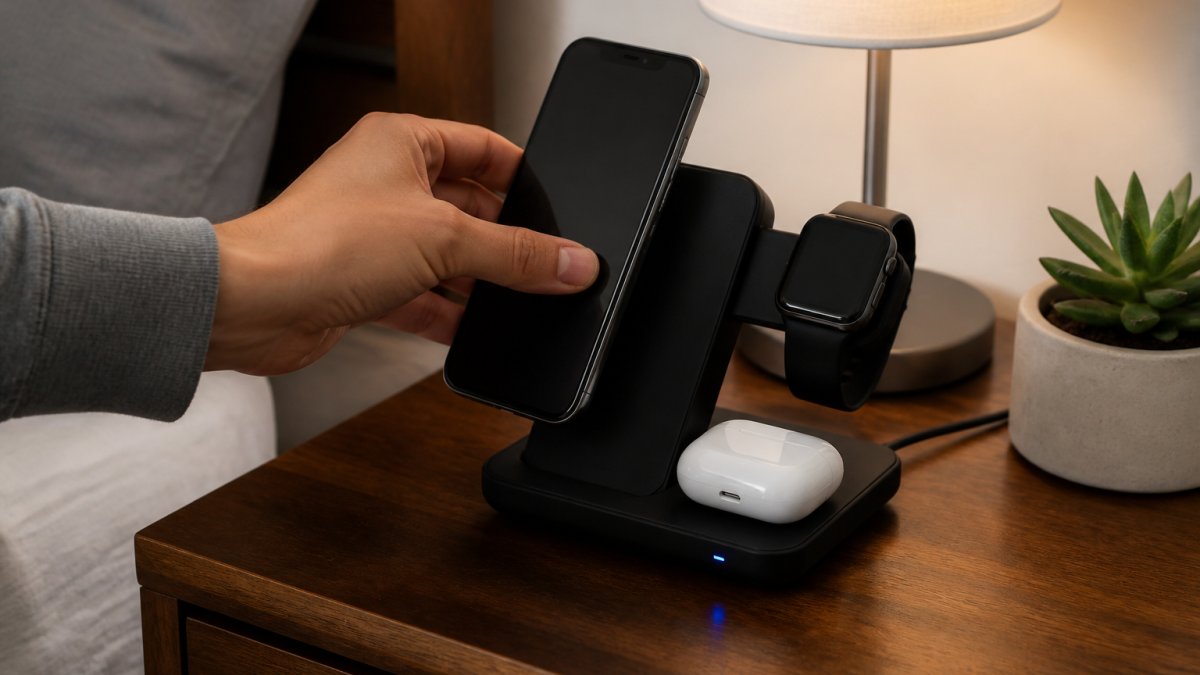
Now place devices one at a time. Alignment is everything with inductive charging: the charging coils in the pad and phone must sit close together.
Here's the placement order that works best:
- Phone first, centered on the main pad
- Watch on its dedicated spot, face up
- Earbuds case flat on the smallest pad
- Tablet last, if your pad supports it
Watch the LED. A steady light means charging. A blinking light usually means misalignment or a foreign object.
Step 4: Manage Cables and Keep the Desk Clear
Cable clutter is why most charging stations end up abandoned in a drawer. Solve it with three small moves.
First, route the pad's cable along the back edge of the surface, not across the middle, and hold it with a cable clip or double-sided tape.
Third, use a charging dock style pad instead of a flat one if you have pets or kids.
3 In 1 LED Fast Wireless Charger Stand Foldable Charging Station →
A few habits that keep the station usable:
- Wipe the charging surface weekly with a dry cloth
- Keep keys, coins, and metal objects off the pad
- Unplug the adapter when you travel for more than a week
The payoff is real: a clean station means you use it every night instead of hunting for a cable.
The Best 3 in 1 Foldable Wireless Charger for Small Spaces
Small apartments and cramped nightstands need a charger that folds flat when not in use. The best 3 in 1 foldable wireless charger collapses into a shape roughly the size of a phone.

Jackie's Attic carries two options that fit this brief. The 3 In 1 LED Fast Wireless Charger Stand Foldable Charging Station runs $15.06 and uses a dual coil design to hold a stable charge without hunting for the perfect spot. It's Qi-certified, with temperature control, voltage protection, and short-circuit prevention, plus ventilation holes to keep it cool during long charges.
The 3-in-1 Folding Wireless Charger at $26.16 adds magnetic alignment and an adjustable bracket, so you can angle the phone for viewing while it charges. It supports fast charging and a 30W total output, enough for a phone, watch, and earbuds at once.
If you need a cable-based backup for travel, the Upgraded Multi Charging Cable for Apple Watch Charger 4 in 1 at $50.71 covers watch, phone, and USB-C devices from a single 4-foot cord.

Troubleshooting Wireless Charging Pads That Stop Working
Troubleshooting wireless charging pads usually comes down to three culprits: heat, thick cases, and misplaced metal. Work through them as a diagnostic sequence, not guess-and-check, each test isolates one variable so you know which fix solved it.
Test 1: Is It Heat?
Heat is the most common reason a pad stops mid-charge. Pads warm up during fast charging, and a thick case traps that heat. Once the pad hits its thermal limit, thermal regulation pauses charging until it cools.
How to confirm it's heat and not something else:
- Charge one device only, on a hard surface, for 20 minutes. If it completes without pausing, heat under multi-device load is your culprit.
- Touch the pad's underside. A pad that's warm to the touch but not hot is normal. A pad you can't hold for five seconds is throttling.
- Move the pad off carpet, bedding, or any soft fabric. Soft surfaces insulate the underside and trap the heat the pad is trying to shed.
On a multi-device pad, heat compounds: three coils in a confined housing raise internal temperature faster than a single-coil pad, which is why a station that charges your phone fine alone may pause when the watch and earbuds join in.
Test 2: Is It the Case?
Cases are the second issue. Most under 3mm thick work fine; anything thicker, or with a metal plate or magnet ring, blocks the field.
A quick way to measure without calipers: a standard credit card is about 0.76mm thick. Stack four cards next to your case, if the case is thicker than that stack, it's a suspect.
Magnet rings deserve a separate mention.
Test 3: Is It Foreign Object Detection?
Foreign object detection is the third. This safety feature shuts the pad down when it senses metal nearby, coins, keys, paper clips, even a stray bobby pin.
Run your hand across the entire charging surface, not just the spot under your phone. On a 3-in-1 pad, a paper clip that slid under the watch spot will shut down the whole station, not just the watch coil.
Test 4: Is It the Cable or Adapter?
If the first three tests come back clean, move down the power chain. Cheap USB-C cables lose voltage over distance, and a pad needing 30W will brown out on a 15W cable.
- Swap the cable for one rated for the pad's wattage. Look for an e-marker chip on cables above 60W.
- Try a different adapter. A 5W phone brick will run a 30W pad, but slowly, and it may shut down the moment a second device lands.
- Unplug the adapter for 30 seconds, then plug it back in. This resets the pad's controller, which sometimes latches into a fault state after a foreign-object trip.
Test 5: Is It the Device?
If the pad still won't charge, test it with a different phone. If a second phone charges fine, the issue is your first phone's coil, case, or charging port, not the station.
Conclusion
Getting a multi-device charging station to work reliably is less about the gear and more about planning the power budget before you buy. Add up your wattage, match the adapter, align the coils, and keep the surface clear.
Jackie's Attic stocks foldable 3-in-1 chargers built for exactly this setup.
Get started with Jackie's Attic and build a charging station that actually clears your desk instead of adding to it.
Frequently Asked Questions
Can you charge multiple devices on one wireless charging station?
Yes, as long as the station has enough charging coils and total wattage output. A 3-in-1 wireless charging station typically has separate spots for a phone, watch, and earbuds, and it splits its power across them. Check the total output before buying: a pad rated for 15W may only deliver 7.5W to a phone when all three slots are active. Qi-certified stations handle this split automatically.
How do I choose the right wattage for a multi-device charging station?
Add up what each device needs, then add 20 percent headroom. A phone fast-charging at 15W, a watch at 5W, and earbuds at 5W total 25W, so look for a station and power adapter rated for at least 30W. Underpowered adapters cause slow charging and heat buildup. Match the adapter to the station's input spec, and use USB-C power delivery where the station supports it.
How do I troubleshoot a wireless charging station that isn't working?
Start with the simplest checks. Confirm the power adapter is plugged in and rated for the station's input, then remove your phone case if it is thicker than 3 mm or has metal in it. Reposition the device so its charging coils line up with the pad's markings. If one slot fails while others work, that coil may be damaged. A blinking LED usually signals foreign object detection, so clear anything metal from the charging surface.
Is it safe to leave devices on a wireless charger overnight?
Yes, provided the station has overheating protection and stops drawing power once a battery is full. Qi-certified chargers include temperature control and voltage protection, which is why certification matters more than price. Keep the pad on a hard, ventilated surface rather than a bed or cushion, since trapped heat is the main risk. If the pad or phone feels hot to the touch in the morning, move it somewhere with better airflow.


