


Table of Contents
- What to Look for in a 3 in 1 charging dock
- Jackie's Attic 3 In 1 LED Fast Wireless Charger Stand: Best Overall
- Jackie's Attic 3-in-1 Folding Wireless Charger: Best Travel-Friendly Charging Dock
- Qi2 Wireless Charging Standards: What They Mean for Compatibility
- How to Choose a Wireless Charging Station for Your Setup
- Long-Term Durability: What to Expect After a Year
- Frequently Asked Questions
Last Updated: September 16, 2026
What to Look for in a 3 in 1 charging dock
A 3 in 1 charging dock is a single station that powers your phone, smartwatch, and earbuds at once, replacing three separate cables with one footprint. The best 3 in 1 charging dock reviews keep circling back to the same handful of specs, because those specs decide whether the thing actually works or just looks tidy on a nightstand.

Here is what matters most:
- Power output and wattage per coil, not the total the box advertises
- Magnetic alignment strong enough to hold a phone in place overnight
- Qi2 certification and whether your device models are supported
- Thermal management so the dock does not throttle mid-charge
- Build quality and a stable stand that does not tip when you grab the phone
Everything else, the LED glow, the foldable hinge, the color options, is secondary. Below, we break down each of these so you can judge any dock on the shelf.
Power Output, Wattage, and Fast Charging
Fast charging on a multi-device dock depends on how the wattage splits across coils, not the headline number. A dock rated for 15W output often delivers that to one device only; add a watch and earbuds and the phone coil drops to a slower rate.
The practical check is the power adapter.
Magnetic Alignment and Stand Stability
Magnetic alignment is what keeps a phone locked to the charging coil instead of sliding off at 2 a.m. A weak magnet or a misaligned coil means the phone drifts, charging stops, and you wake up to a dead battery. Qi2 uses a ring of magnets to standardize this alignment, so a compatible phone snaps into the correct position every time.
Jackie's Attic 3 In 1 LED Fast Wireless Charger Stand: Best Overall
Our top pick for most setups is the 3 In 1 LED Fast Wireless Charger Stand from Jackie's Attic. It uses a dual-coil design that holds a stable charge without the usual overheating or the hunt for the "perfect spot" on the pad, and the foldable body collapses flat for storage.
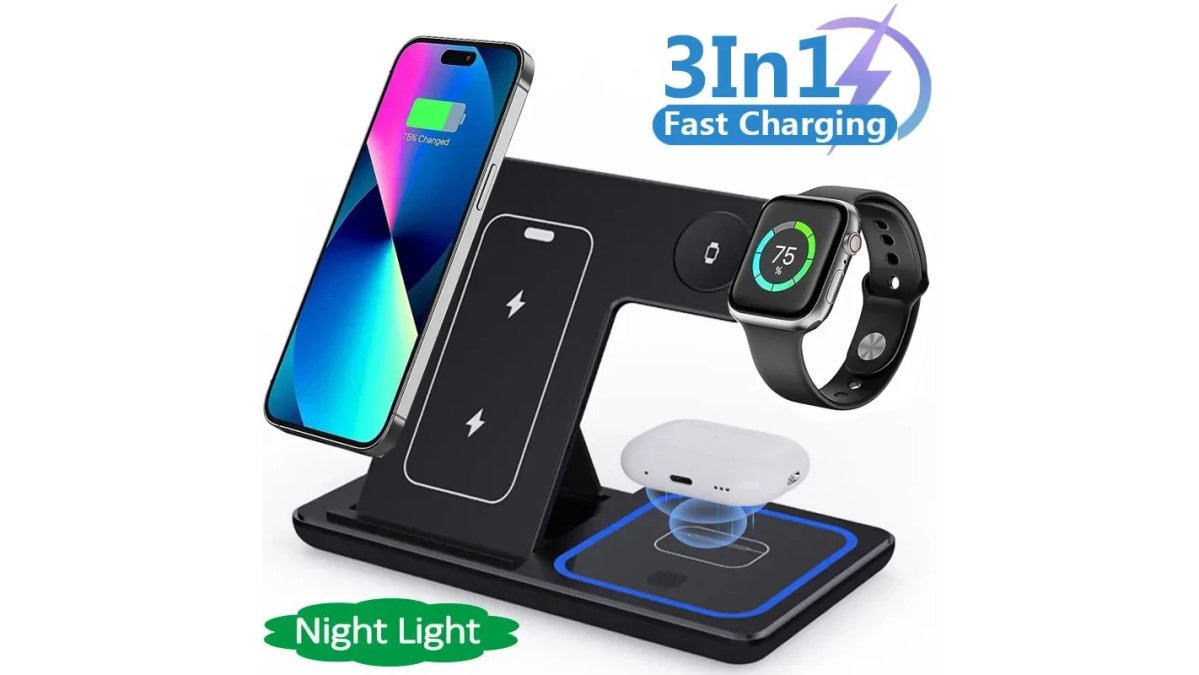
Pros and Cons
Pros:
- Dual-coil design for stable, consistent charging
- Foldable body for storage and travel
- Qi-certified with temperature, voltage, and short-circuit protection
- USB-C interface
- $15.06, well below comparable three-device docks
Cons:
- Ships as the charger only; you supply the power adapter
- Plastic body rather than metal
Jackie's Attic 3-in-1 Folding Wireless Charger: Best Travel-Friendly Charging Dock
For a dock that leaves the house, the 3-in-1 Folding Wireless Charger from Jackie's Attic is the better pick. The folding design stores flat, and the adjustable bracket lets you set the phone angle for alignment rather than propping it against a wall.

Pros and Cons
Pros:
- Folding design for portability
- Adjustable bracket for alignment
- Fast charging and magnetic charging support
- PD protocol over USB-C
- Charges three devices at once
Cons:
- Costs more than the LED stand at $26.16
- Folding hinge is a wear point over years of use
Qi2 Wireless Charging Standards: What They Mean for Compatibility
Qi2 is the wireless charging standard that adds a magnetic alignment ring to the original Qi specification, so a compatible phone locks to the coil instead of relying on you to place it correctly. For a multi-device dock, that matters because a phone that shifts even slightly loses charging efficiency. The magnetic ring holds the coil and the phone's receiver in the same relative position all night, which keeps the charge rate steady instead of oscillating as the phone creeps.
3 In 1 LED Fast Wireless Charger Stand →
Device compatibility breaks into three groups:
- Phones with built-in magnets align natively. Recent iPhone models from the 12 series onward have the magnet array built in, and a growing set of Android flagships now ship with a comparable ring.
- Phones without built-in magnets need a magnetic case or a magnetic ring accessory stuck to the back. Without one, the phone still charges, but it will not snap into alignment and can drift.
- Older devices that predate Qi2 still charge on a Qi pad, just without the magnetic snap and often at a lower wattage ceiling.
Qi2 vs. Original Qi: What Actually Changes
The difference is not just the magnet. Qi2 also tightened the power profile. Under the original Qi spec, a phone on a pad could negotiate up to 15W only under specific conditions, and many phones settled at 7.5W or 10W. Qi2 standardizes the magnetic alignment and sets a cleaner path to 15W for supported hardware, with a later revision pushing the ceiling higher for phones and adapters that both support it.
What that means for a three-device dock:
- A Qi2 phone on a Qi2 dock gets the full magnetic alignment and the highest rate the dock can deliver to that coil.
- A Qi2 phone on an original Qi dock still charges, but you lose the snap and may drop to a lower wattage tier.
- An original Qi phone on a Qi2 dock charges at its own ceiling, with no magnetic benefit unless you add a magnetic case or ring.
Matching the Dock to Your Watch and Earbuds
Qi2 governs the phone coil. The watch and earbud coils usually run on their own proprietary or low-wattage Qi profiles, and this is where cross-brand compatibility gets messy.
- Smartwatch coils are frequently brand-specific. A dock built for one watch family may not charge another, even if both use wireless charging. Check the listing for the exact watch models supported before buying.
- Earbud coils are more forgiving because most earbud cases charge at 5W or less over standard Qi, but a case with an unusual coil position can still miss the pad.
- Phone cases matter too. A thick case, a case with metal plates, or a case with a magnet array that does not match the dock's ring can weaken alignment and cut the charge rate.
How to Choose a Wireless Charging Station for Your Setup
Choosing a wireless charging station comes down to three questions: how many devices you charge nightly, how much space you have, and whether you travel with it. Answer those and the spec sheet narrows fast.
| Your setup | Priority | Best pick |
|---|---|---|
| Nightstand, three devices | Stability, safety features | Jackie's Attic LED Fast Wireless Charger Stand |
| Travel and small spaces | Folding, portability | Jackie's Attic 3-in-1 Folding Wireless Charger |
| Desk with limited space | Small footprint | Folding charger, adjusted flat |
| Single phone only | Low cost | Any Qi pad |
Cable Management and Power Adapter Requirements
Cable management is the detail most reviews skip, and it is the one that decides whether a dock actually declutters your space. A three-device dock replaces three cables with one, but only if you route that single cable well. A right-angle USB-C connector helps, and a cable clip on the back of the nightstand keeps the run hidden.
Nightstand Ergonomics and LED Light Pollution
Nightstand ergonomics come down to reach and light. A dock should sit at a height where you can drop the phone in one motion without knocking over a water glass, and the stand angle should let you read a notification without lifting the phone.
Long-Term Durability: What to Expect After a Year
Durability on a charging dock comes down to three parts: the coils, the hinge, and the cable. Coils themselves rarely fail; the connection points and moving parts do.
Frequently Asked Questions
Which 3 in 1 charging dock is the best for most people?
The Jackie's Attic 3 In 1 LED Fast Wireless Charger Stand is a strong all-rounder at $15.06. It uses a dual coil design for stable fast charging, includes temperature control, voltage protection, and short-circuit prevention, and has ventilation holes on the back for cooling. If you travel often, the Jackie's Attic 3-in-1 Folding Wireless Charger at $26.16 folds flat and supports magnetic charging with up to 30W output.
Do 3 in 1 charging docks support fast charging for all devices?
No. Fast charging depends on the dock's wattage, the power adapter you supply, and whether each device supports the same standard. The Jackie's Attic 3-in-1 Folding Wireless Charger lists 15W output power, 30W maximum output, PD charging protocol, and a Type-C interface, so it can fast-charge compatible phones. Watches and earbuds typically draw less power and charge more slowly regardless of the dock.
How do I know if my phone is compatible with a 3 in 1 charging dock?
Check whether your phone supports Qi wireless charging, and if you want magnetic alignment, whether it supports magnetic charging. The Jackie's Attic 3-in-1 Folding Wireless Charger lists magnetic suction three-in-one and magnetic charging support. Phones without magnets can still charge on a Qi pad but may need careful placement. The LED Fast Wireless Charger Stand is Qi-certified and uses a dual coil design to reduce the need to hunt for the right spot.
Are foldable 3 in 1 charging stations as durable as stationary ones?
Foldable docks use hinges, so the folding joint is the part most likely to wear over time. The Jackie's Attic 3-in-1 Folding Wireless Charger is built with a folding design for storage and portability, and its adjustable bracket holds devices at the right angle for charging. If the dock stays on one desk and never moves, a stationary stand like the LED Fast Wireless Charger Stand avoids hinge wear entirely.


