


Table of Contents
- What the Anker MagGo Power Bank Actually Solves
- Anker MagGo Power Bank Charging Instructions, Wired and Wireless
- Anker MagGo 10K Slim Battery Life: What 10,000mAh Really Delivers
- Anker MagGo Power Bank Compatibility: Phones, Cases, and Limits
- Anker MagGo vs MagSafe Power Bank: Which Type Fits Your Day
- Mistakes to Avoid When Buying a Magnetic Battery Pack
- Conclusion
- Frequently Asked Questions
Last Updated: October 17, 2026
What the Anker MagGo Power Bank Actually Solves
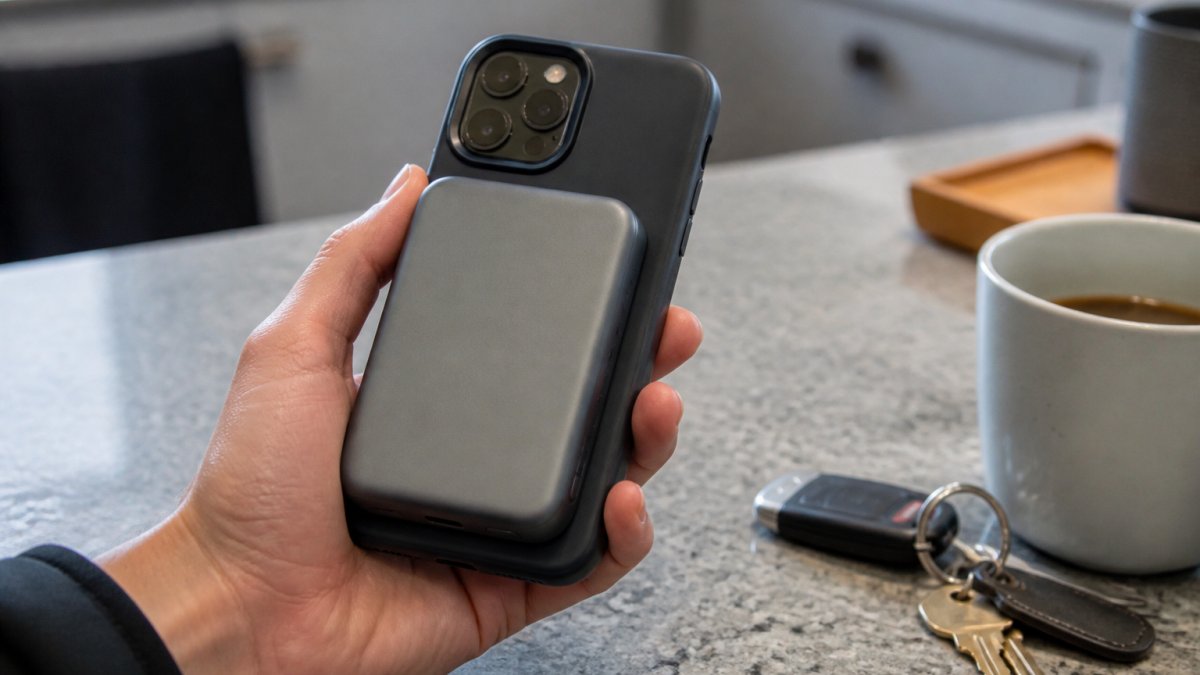
The Anker MagGo power bank is a magnetic wireless battery pack designed to snap onto the back of a compatible phone and charge it without a cable.
Here's the honest answer. A magnetic pack is not faster than a wall charger. It is not lighter than a slim wired power bank.
That distinction matters more than any spec sheet. Most buyers focus on capacity and wattage, then get surprised when the pack feels bulky in a pocket or slides off a thick phone case.
Anker MagGo Power Bank Charging Instructions, Wired and Wireless
Charging with the Anker MagGo power bank works two ways: wireless through magnetic alignment, or wired through the USB-C port. Both are straightforward, but they serve different moments. Knowing which to reach for saves time and battery stress.
Wireless charging with magnetic attachment
Snap the pack onto the back of a MagSafe-compatible iPhone and charging starts automatically. No button press, no cable, no alignment guesswork. The magnets center the coils for you, which is the whole point of the design.
A few practical notes from how these packs behave in daily use:
- Remove thick or metal-plate cases first. Magnets lose grip through bulky material.
- Expect the pack to warm up slightly during wireless charging. That's normal, not a fault.
- Wireless charging is slower than wired by design. Use it for top-ups, not full-speed refills.
Wired charging and pass-through use
Plug a USB-C cable into the pack's port and you get faster wired output, which is the better choice when you need a quick, meaningful charge. Many models also support pass-through charging, meaning you can charge the pack and your phone at the same time from one wall outlet.
The trade-off is obvious. Wired is faster but requires a cable. Wireless is slower but requires nothing. Most people end up using wireless on the go and wired at a desk.
Anker MagGo 10K Slim Battery Life: What 10,000mAh Really Delivers
A 10,000mAh rating sounds impressive until you translate it into real charges.
That's the number most listings bury. Wireless charging efficiency is lower than wired, so the same pack delivers noticeably fewer charges through the magnet than through a cable.
The "Slim" in the name refers to the form factor, not a stripped-down battery. A 10,000mAh pack in a slim body is a genuine balance of capacity and portability.
What it won't do is last a multi-day camping trip. For that you need a larger pack.
Anker MagGo Power Bank Compatibility: Phones, Cases, and Limits
Compatibility is where most buyers get burned, and it is the one area where the spec sheet tells you almost nothing. The Anker MagGo power bank is built around the Qi2 magnetic standard, which means it aligns with the magnet array Apple introduced on the iPhone 12 and every model since.
Which iPhones actually hold the pack
The magnetic hold is strongest on bare phones and on cases that carry Apple's MagSafe magnet array. A common pattern is that the pack grips firmly through a thin MagSafe-certified case, feels noticeably weaker through a thick rugged case, and slides or spins through a wallet case or any case with a metal plate. As a practical rule, if your case is thicker than about 2 to 3 millimeters at the back, or if a magnet does not snap to it, expect the grip to be unreliable.
Android and non-MagSafe phones
Android phones generally lack a built-in magnet ring, so the pack will not grip them out of the box. The workaround is a magnetic ring accessory or a MagSafe-compatible case made for your specific model. Once a ring is in place, the pack will attach and charge wirelessly, but alignment depends on how precisely you place the ring. Off-center rings cause slower charging and more heat. If you use an Android phone daily, a wired pack is the lower-friction choice.
The limits worth knowing before you buy
- iPhone 11 and older: no built-in magnets, so the pack will not attach without an added ring.
- Thick or rugged cases: magnets lose grip and the charging coil loses efficiency; remove the case or switch to a slim MagSafe-certified one.
- Wallet cases and metal plates: interfere with both the magnets and the coil; do not use them with a magnetic pack.
- PopSockets and grips: remove them before attaching the pack, or the coils will not line up.
- Metal objects: keep cards, keys, and coins away from the charging surface to avoid heat and interference.
- Qi2 vs MagSafe labeling: the pack aligns with MagSafe-compatible iPhones, but check the product page for the specific Qi2 certification mark rather than assuming every magnetic pack is certified.
Anker MagGo vs MagSafe Power Bank: Which Type Fits Your Day
The Anker MagGo versus a generic MagSafe power bank comes down to three things buyers actually weigh: certification, model fit, and what you pay for the convenience. "MagSafe" is Apple's standard, and third-party packs that carry official certification are built to Apple's magnetic and charging spec. The Anker MagGo line is designed around that same magnetic attachment approach, which is why it aligns cleanly with MagSafe-compatible iPhones. But "MagGo" is a family name, not a single product, and the differences between models matter more than the badge.
Know which MagGo you are comparing
The MagGo family includes a 10K Slim magnetic pack, a foldable 3-in-1 charging station, and a magnetic battery with a built-in stand and USB-C cable. They share the magnetic attachment idea but serve different jobs. The 10K Slim is the one you carry; the 3-in-1 station stays on a desk or nightstand; the stand-and-cable model is the hybrid for people who want hands-free viewing and a wired option in one body.
A standardized comparison you can actually use
Most listings bury the trade-offs. Here is the same set of criteria applied across the three common choices, so you can see where the premium goes.
| Criterion | Anker MagGo 10K Slim | Generic certified MagSafe pack | Standard wired 10,000mAh pack |
|---|---|---|---|
| Capacity | 10,000mAh | Typically 5,000 to 10,000mAh | 10,000mAh |
| Wireless output | Qi2 magnetic, up to 15W | Varies; confirm certification | None |
| Wired output | USB-C, up to 30W | Usually lower or absent | USB-C, often 18W to 30W |
| Built-in cable | Model-dependent | Rarely | Sometimes |
| Stand or hands-free | Model-dependent | Rarely | No |
| Thickness and carry | Slim, pocketable | Varies widely | Usually thicker |
| Typical street price | Premium tier | Mid tier | Value tier |
The pattern is consistent: you pay a premium for the magnet array, the Qi2 certification, and the slim body. The wired pack wins on price per milliamp-hour; the magnetic pack wins on the number of days you actually remember to bring it.
The value and total-ownership trade-off
A magnetic pack rarely wins on raw specs per dollar. It wins on usage rate. If a cheaper wired pack stays in a drawer because you forget the cable, the effective cost per charge is higher than the sticker price suggests. The premium is justified when the pack snaps on and disappears into your routine, and when the built-in cable or stand replaces a separate accessory you would otherwise buy.
When each type fits your day
- Frictionless daily top-ups: magnetic pack, because it snaps on with no cable and no thought.
- Fastest charge in a pinch: wired output, because USB-C delivers more power than wireless.
- Thin case, light carry: slim magnetic pack, the balance of capacity and size.
- Heavy case or Android: wired pack or a magnetic ring adapter, because the magnets will not grip reliably.
- Multi-day travel: a higher-capacity pack, because 10,000mAh is a one-day reserve.
The mistake is buying a magnetic pack for speed. Buy it for convenience, confirm the model number and Qi2 certification on the listing, and use the cable when speed matters.
Size and heat are the two things you can't judge from a product photo, and they're the two that decide whether you'll actually carry the pack.
Heat management separates good packs from cheap ones. Wireless charging generates warmth, and a pack that runs hot drains faster and ages quicker.
Build quality shows in the details: firm magnet pull, no rattle when you shake it, a port that seats a cable snugly. Those small signals tell you more about longevity than any capacity figure.
A pack that gets uncomfortably hot during wireless charging is a red flag. Stop using it and check the warranty. Persistent overheating can shorten battery life and, in rare cases, signal a defective cell.
Mistakes to Avoid When Buying a Magnetic Battery Pack
The biggest mistake is buying on capacity alone. A 20,000mAh pack sounds better until you realize you'll leave it at home because it's too heavy.
A common mistake is assuming wireless means fast. It doesn't. Wireless is convenient, wired is quick. Buy for the one you'll use most.
Second, check the case before the pack.
Third, don't ignore the cable.
Fourth, think about warranty and battery health. Lithium packs degrade over time, and a clear warranty is your safety net.
Conclusion
A magnetic battery pack only earns its place if it fits your phone, your case, and your actual day.
If you're shopping for charging gear that fits real routines, Jackie's Attic curates practical lifestyle gadgets and charging accessories built for everyday use. Browse our collection to find space-saving charging solutions and convenience tools that earn their spot on your desk and in your bag.
Frequently Asked Questions
How do I charge the Anker MagGo power bank itself?
You recharge the pack through its USB-C port with a USB-C cable and a wall adapter. Wireless charging only works one way: the pack charges your phone, not the other way around. A higher-wattage adapter refills the pack faster than a low-power one, so check the output rating on the brick you plan to use. If you want to charge the pack and a phone at the same time, expect the pack to refill more slowly because the power is split between tasks.
How many times can a 10,000mAh power bank charge a phone?
In practice, a 10,000mAh pack usually delivers roughly one and a half to two full charges to a modern phone. The rating is the cell capacity, not the amount that reaches your phone. Wireless charging loses more energy to heat than a cable, so a magnetic top-up gives you fewer total charges than wired. If you need two guaranteed full charges on a travel day, plan on a cable for at least one of them.
Does the Anker MagGo power bank work with a phone case on?
It depends on the case. A thin MagSafe-compatible case with a built-in magnet ring holds well and keeps wireless charging efficient. Thick wallets, metal plates, and pop sockets interfere with the magnetic attachment and can block charging entirely. Test the grip before you rely on it in a pocket or bag. If the pack slides or the charge keeps stopping, remove the case and try again to confirm the case is the cause.
Can the Anker MagGo power bank charge a phone while it is charging?
Yes, pass-through charging is supported, but it comes with trade-offs. When the pack is plugged into a wall and a phone is attached, the pack splits its output and the phone charges more slowly than it would alone. The pack also runs warmer during pass-through, and sustained heat is the main thing that shortens battery health over time. For overnight charging, plugging the phone into the wall directly is the simpler, cooler option.


